

Gold will not wait while you look for the right button. You see your XAUUSD setup. You know the size you intend to use. You have a plan for reducing the position and managing the exit. Yet between the decision and the action sit windows, tabs and another dialog. It is a familiar frustration for a scalper: the trade needs your attention, and the interface keeps asking for it.
APEX Scalping Terminal was built for a different working rhythm. It is your dedicated MetaTrader 5 scalping control desk: prepared hotkeys, ten volume presets, individual position cards, macros and named exit plans. The controls you reach for from entry to close come together in one Windows application alongside your MT5.
The trader owns the setup. The workspace should put the intended command within reach. That is the idea behind APEX: keep gold in focus and keep control of the trade. Prepare the tools around the sequence you use, so familiar management actions have a deliberate place on your desk.
If you arrived looking for MT5 hotkeys, look beyond the entry button. The real work continues after Buy or Sell. Here you can assess the entire route: size, entry, a specific ticket, partial exits, protection and management. Explore APEX Scalping Terminal through actual application screens and decide how you want your next session to feel.
Keep gold in focus. Keep your controls within reach.
Picture a familiar moment: XAUUSD is approaching a level you have been watching. You already have a plan, but carrying it out means finding the right control. After entry, the task changes. Now you need to see the actual position size, check protection, decide whether to reduce exposure and prepare the next exit action. When those controls sit in separate places, you repeatedly rebuild the context of the trade.
Attention is part of a scalper’s working capital. Every search for a familiar control draws it away from the current task. It would be misleading to assign it a universal dollar value or claim every trader loses a particular number of points. The practical problem is easier to recognise: you know what you intend to do, but your hand is still searching for the command. A short trading scenario leaves little appetite for that friction. APEX was developed to put prepared commands and position state into a dedicated, legible workspace.
Gold is the main example in this article because the actual APEX captures show XAUUSD. It does not follow that every broker offers the same symbol or contract specification. Check the exact symbol name, minimum volume, volume step and point size on your account. The workflow stays consistent: analyse the market, issue a deliberate action and inspect the position that actually exists afterwards.
INSIDE APEX · ACTUAL DEMO INTERFACE
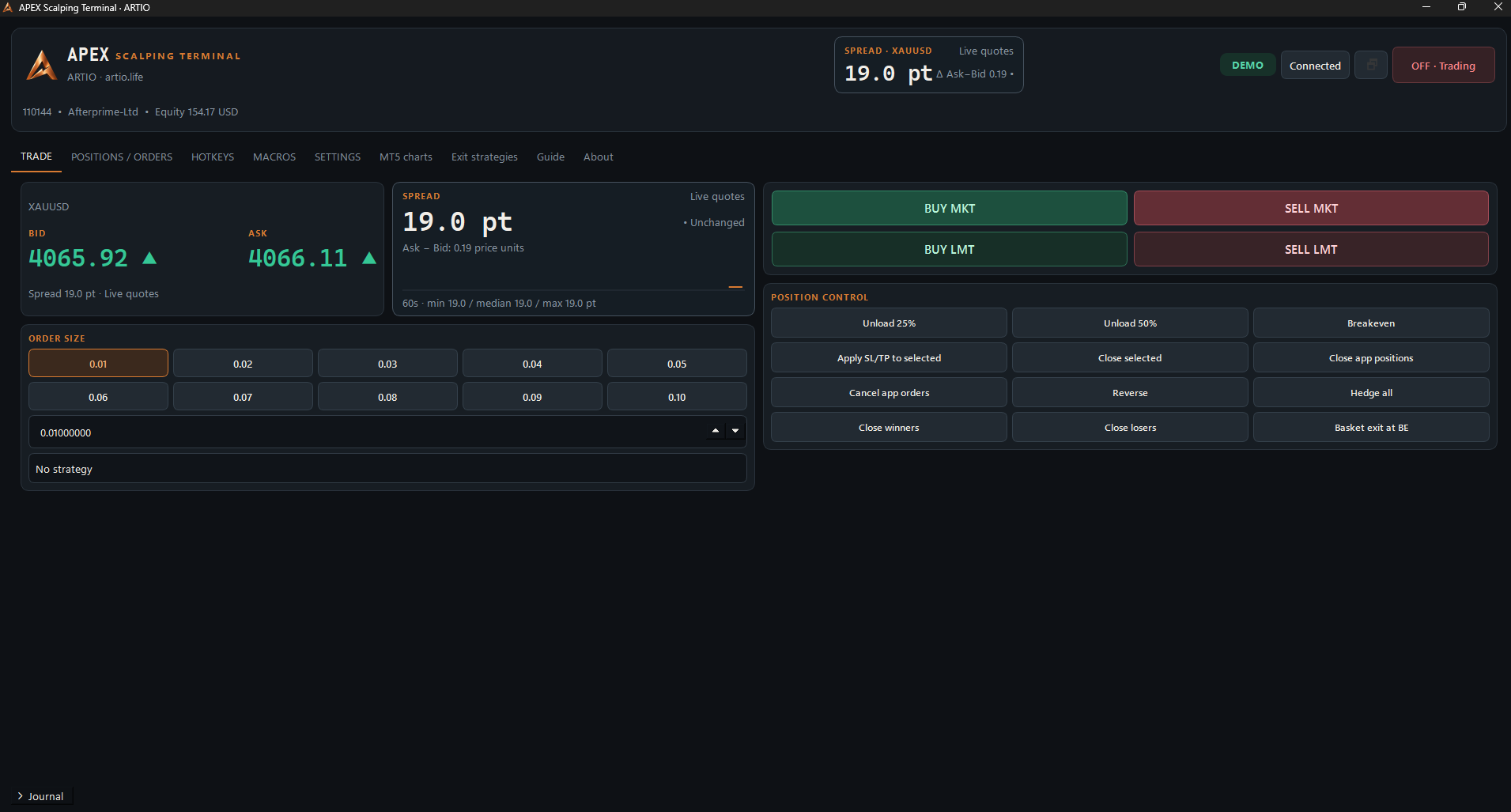
A scalper deserves a dedicated MT5 control desk.
MetaTrader 5 already provides trading commands and One Click Trading. APEX adds a different organisation of the desk: your keyboard actions, selected sizes and position management are arranged around the work of handling a short trade. It runs alongside a working MT5 terminal on Windows and uses that terminal's connection. A new interface does not require changing broker by itself, although permissions and compatibility still need checking in your own environment.
APEX gives the management sequence a deliberate home: prepare volume, enter on your own decision, inspect a specific ticket, reduce it, adjust protection and verify the command result. A buy or sell hotkey covers only one part of that sequence. Much of APEX's usefulness appears after entry, when a position is open and the management decisions arrive one by one.
The application does not claim to discover a profitable entry for you. The setup, direction, risk and decision to trade belong to the trader. APEX provides execution and management tools around that decision. For a scalper, a connected set of relevant controls can be more useful than a long list of features that never become part of a normal session.
APEX hotkeys: prepare your hands for your setup.
A keyboard becomes useful when each press has a clear, prepared meaning. APEX offers editable bindings, a visual keyboard map, physical keyboard selection and a key test that does not send orders. You can establish a familiar layout and check whether the intended device is recognised. Learning the controls can start with a no-order test instead of an experiment on an open position.
Trade hotkeys have a configurable scope: MT5/APEX focus or global mode. That choice affects how the desk behaves, so check it with the applications and keyboards you actually use. Open editors and the test mode block trading key actions. If a selected physical keyboard is unavailable, do not assume the system will silently substitute another device and continue as before.
For gold trading, it is useful to prepare size separately from the execution command. APEX provides ten editable volume presets, keeping familiar values within reach. A preset is a convenient selection, not a calculation of acceptable risk. Position size for your particular XAUUSD contract still depends on your trading plan, the symbol specification and the broker's volume constraints. Practise that distinction before using the commands in a session.
ACTUAL APEX INTERFACE · DEMO
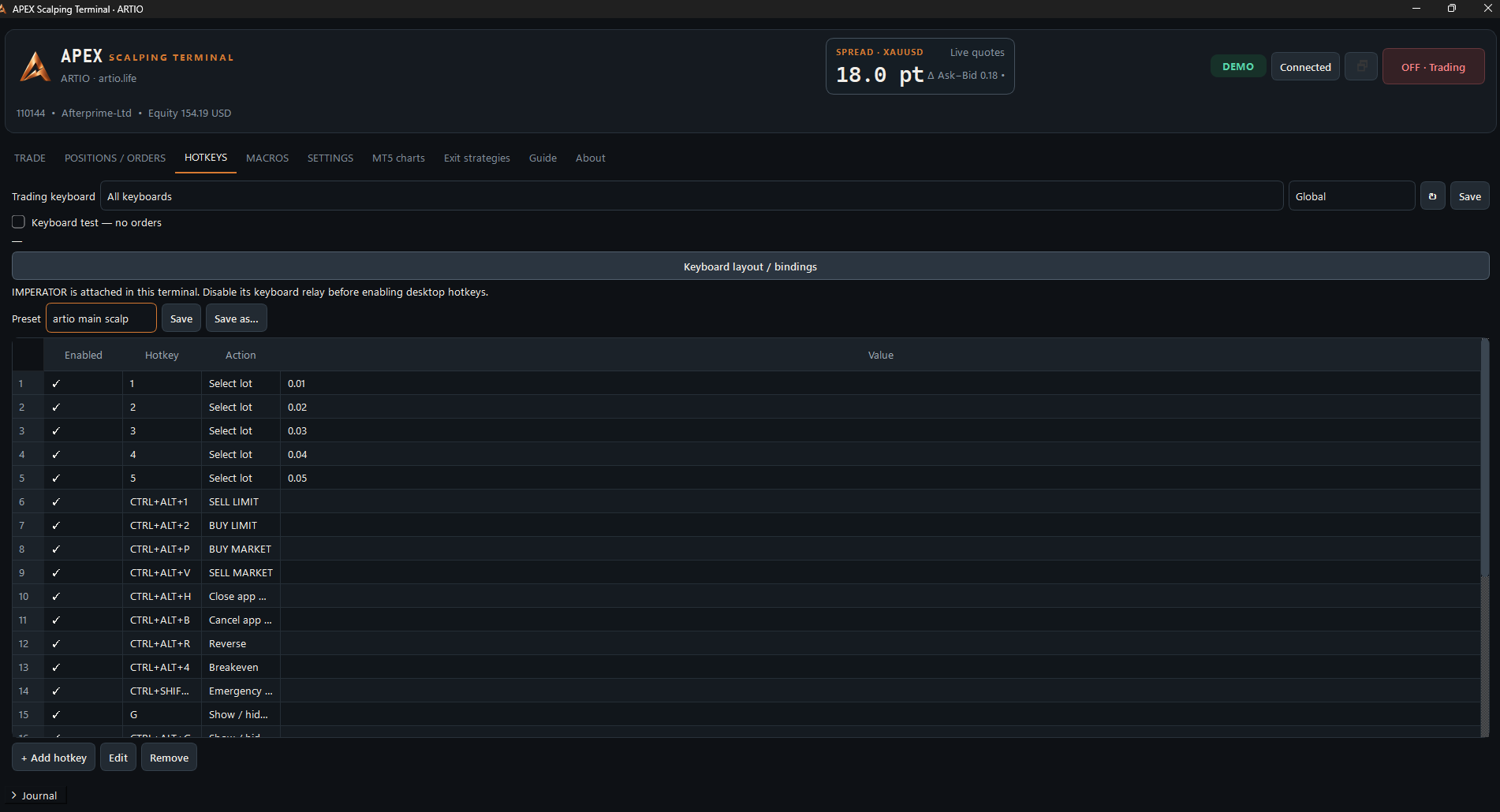
Entry is the beginning. Stay in command of the position.
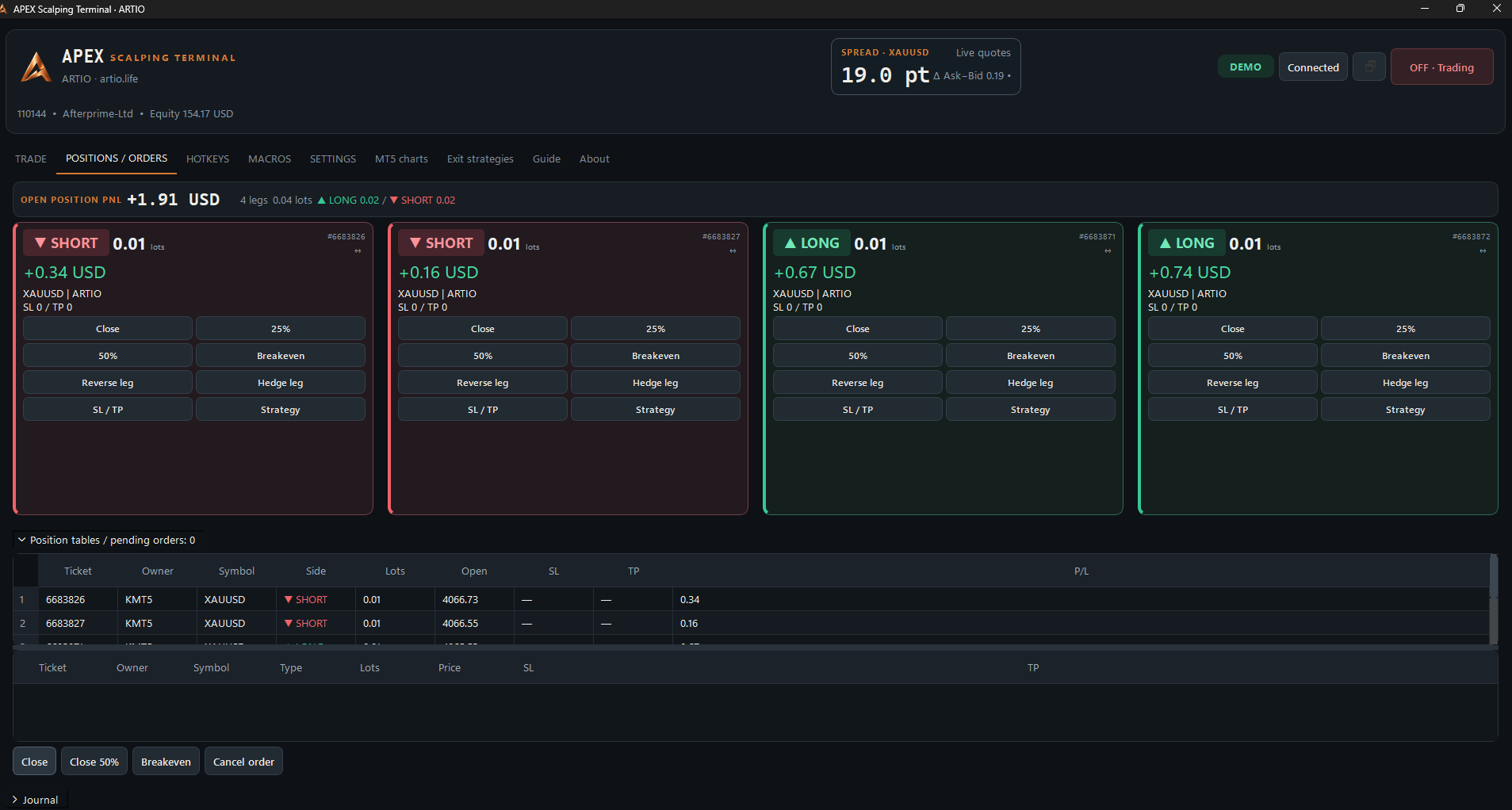
A well-timed entry still needs a well-prepared management desk. Entry starts the work. Afterwards, you need to know which ticket you are changing, how much volume remains and what the last action actually did. APEX presents positions as individual cards with direction, volume, displayed current PnL, SL/TP and relevant controls together. A specific ticket becomes a clear management target that you can return to after checking the chart.
Card actions include Close, 25%/50% partial close, BE, Reverse, Hedge and exit-plan assignment. This is a practical management set for working through a position. Partial closes remain subject to valid broker volume and remainder limits: do not expect an invalid fraction to be increased automatically on your behalf. Test the actual symbol and size on Demo before relying on that fraction in your own workflow.
On a hedging account, related legs can be kept adjacent and visually grouped. On a netting account, positions in a symbol are aggregated, so creating an independent hedge is a different proposition and is refused by APEX. Reverse and direct pair closing are sequential operations, not atomic guarantees. Clear controls help you work with the structure of a position; the account model and broker execution rules still determine what can be done.
ACTUAL APEX INTERFACE · DEMO
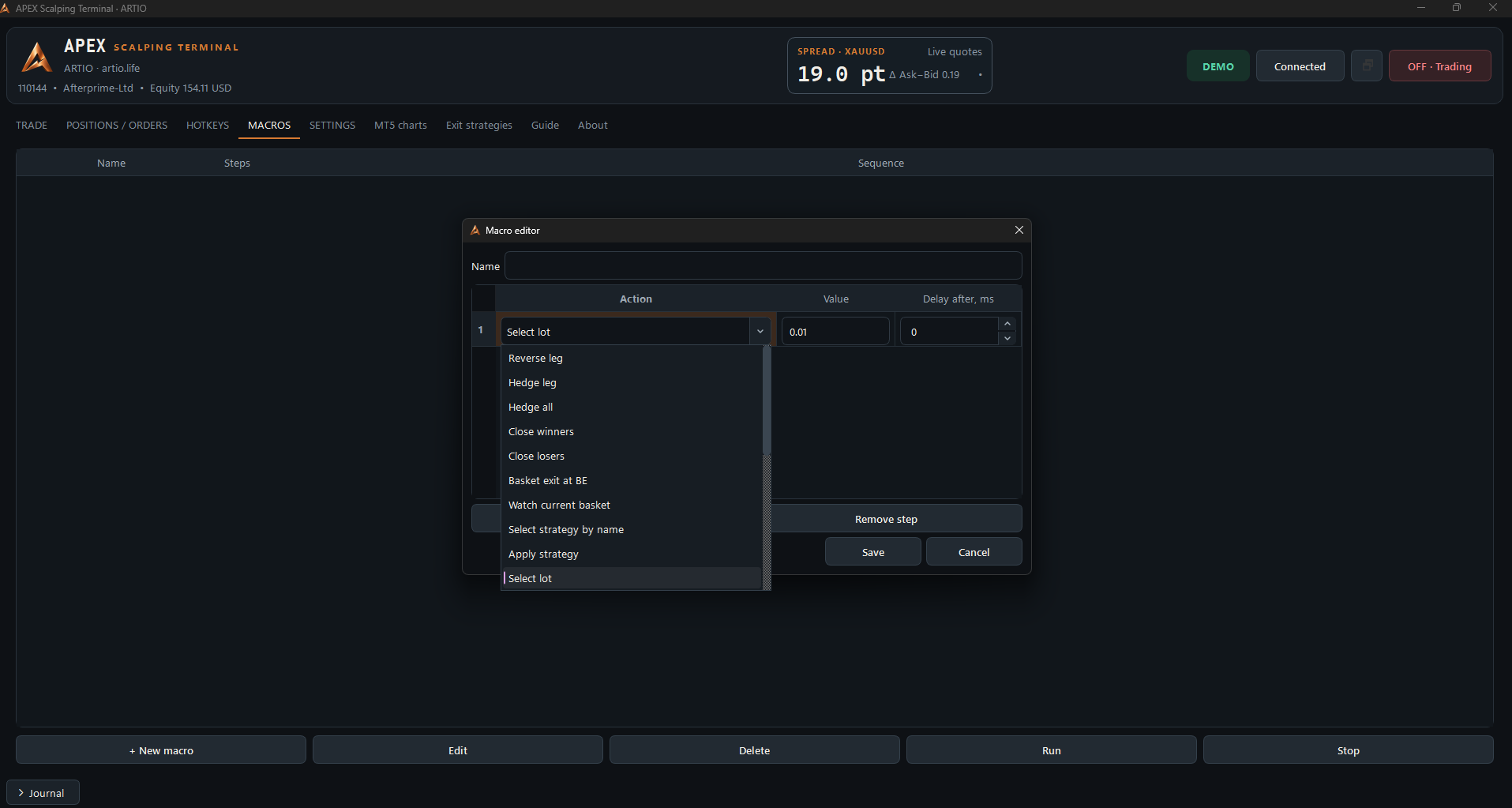
Your sequence. Your macro. Your APEX.
Your trading style has an order of operations. An established style often includes familiar combinations of actions. Rebuilding the same sequence by searching for each command makes you spend attention on a routine you already know. In APEX's macro editor, selected actions can be saved as a named sequence with delays between steps. The expanded menu includes volume selection, leg operations, basket actions and strategy selection. The capture below shows the actual editor, rather than an invented diagram of how it might work.
A trading step does not simply start the next command when a timer expires. The macro waits for the previous operation's result. A rejection or known partial execution stops the sequence; requests are not automatically retried. That matters when managing a short trade: the sequence should not silently keep following an old plan after the position state has changed from what you expected.
You start the macro deliberately. It does not enable trading on your behalf, turn APEX into an autonomous entry system or choose the market moment. After a stop, inspect the position and decide what to do next. The purpose is to preserve a prepared order of operations for the occasions when you choose to apply it to the current situation.
ACTUAL APEX INTERFACE · DEMO
Give the exit the same preparation as the entry.
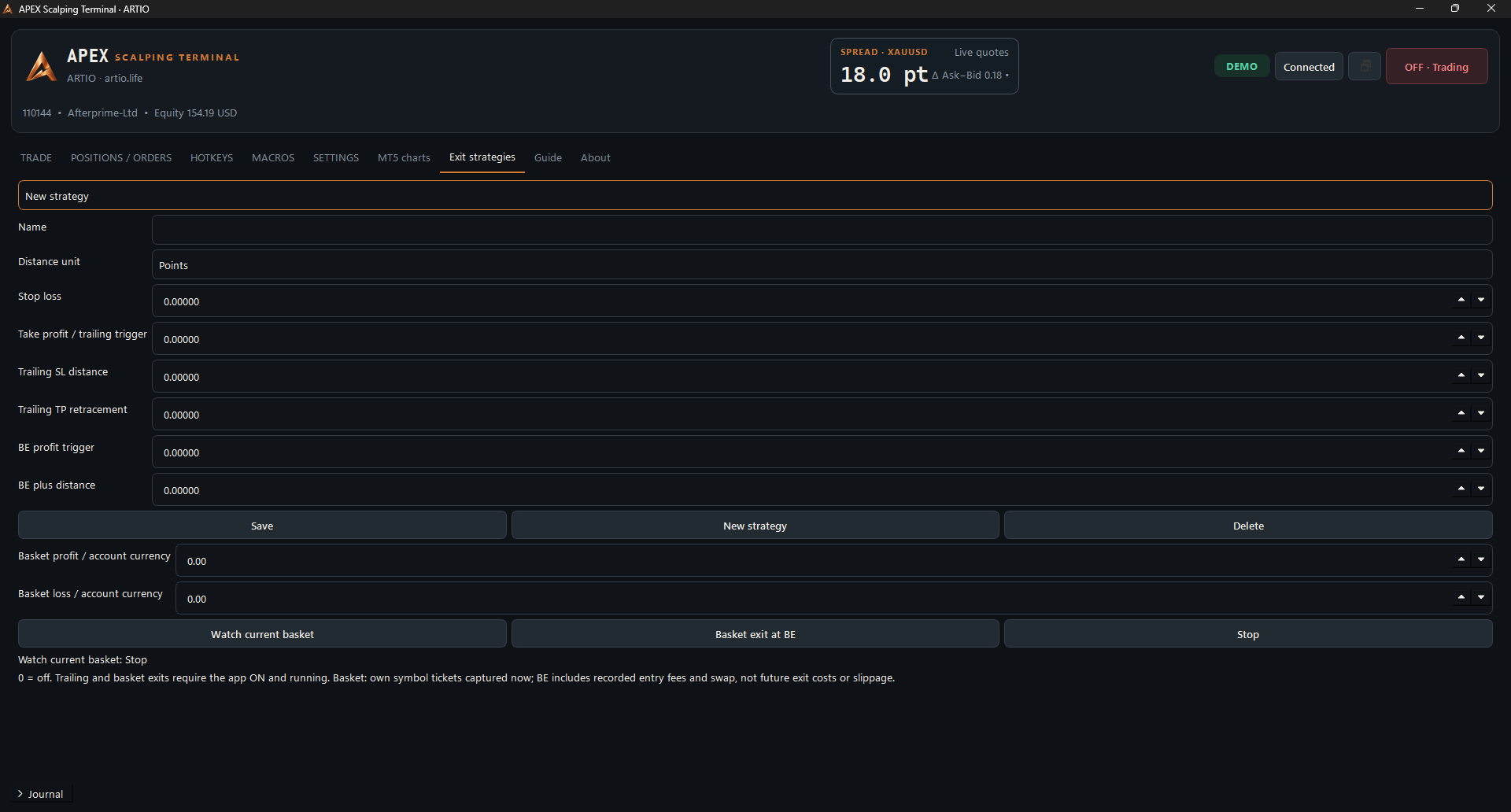
The plan should not end at entry. Exiting a position can demand more management than opening it. Different scenarios may call for fixed SL/TP, a protection adjustment, trailing SL or a virtual trailing TP. APEX lets you save named exit plans, select them for new entries or explicitly apply them to an existing owned position. Parameters can use MT5 points or a percentage of the entry price, with the actual instrument kept in mind.
An applied plan is stored as its own copy. Editing the template does not silently rewrite the management already assigned to an open ticket. You can prepare a later scenario while keeping the existing position's plan distinct. Applying a different plan to a current position is still an explicit action, and you need to check that the selected plan is the one you intend.
Broker-accepted server SL/TP differ from software rules. Trailing, virtual TP and basket watching require APEX running, ON, connected to MT5 and receiving fresh quotes. A virtual trailing TP is not a fixed server take profit. The BE action and estimated basket breakeven also cannot guarantee a zero financial result: unknown exit costs and slippage cannot be fully settled in advance. These distinctions help you choose which protection belongs where.
ACTUAL APEX INTERFACE · DEMO
XAUUSD in view: spread, size and your decision.
For XAUUSD, it is useful to see current execution conditions close to the controls. The APEX header displays quotes and spread in MT5 points, alongside the raw Ask–Bid price difference. You can compare that state with your own requirements before issuing an action, then return to the position card. The application does not promise to lower the broker's spread or eliminate slippage.
Be careful about carrying a familiar number of “gold points” from one account to another. The symbol specification defines point size, minimum price change, volume step and trading constraints. The same-looking volume preset therefore cannot be described as the same risk across every instrument or broker. These properties are documented in the official MQL5 Symbol Properties reference.
The practical benefit is a clearer decision point: relevant numbers are visible where the command is being prepared. Whether the current conditions are acceptable remains your call. A prepared control desk should support your plan, including a decision to skip the trade rather than press a key simply because it is available.
From chart to managed position, one connected workflow.
Start with preparation. Choose the broker's exact gold symbol, confirm the account, configure acceptable volume presets and set your key bindings. Test keyboard input without orders. On Demo, check individual commands, partial exits, plan application and rejection behaviour. Only then rehearse the whole sequence you intend to use during a session.
While observing the market, keep the chart as the place for analysis. When your own setup is ready, prepared controls let you move towards execution without searching for every element again. After entry, inspect the actual position card and verify size and protection. The next action, whether a partial close, a plan assignment or a full close, needs to match the current state rather than the state that existed before the last key press.
APEX can also control a selected MT5 chart through the optional ChartBridge. This has its own requirements: chart hotkeys need foreground MT5 and the bridge attached to the intended chart. Global trade hotkey mode does not remove that requirement. Hiding trade lines changes chart visibility; it does not cancel orders or remove SL/TP. The bridge is not mandatory for the basic API trading connection.
For traders who make the call and expect more from MT5.
APEX is especially relevant to a trader who manually scalps gold on MT5 and wants management to feel like one connected process. If you regularly use several sizes, individual tickets, partial exits, repeated actions and prepared exit plans, those features can form a practical daily workspace. The value lies in the entire management chain, rather than in finding buy and sell buttons alone.
XAUUSD is the focus here, but the control approach can also be assessed for other instruments available in your MT5 environment. This article does not establish acceptance of every broker, account type or execution mode. Check your actual configuration first. Similar-looking actions can have different consequences under hedging and netting; those accounting models are explained in the official MetaTrader 5 trading concepts guide.
The intended user wants to make the trading decision personally and have prepared management tools close by. A request for autonomous entry selection, guaranteed returns or cloud management after the computer is switched off would require different capabilities from the Windows control desk described here. Assess the tool against the work you actually want it to handle.
Prepare deliberately. Execute deliberately.
APEX starts with execution OFF; the user explicitly switches it ON. REAL accounts require a separate permission setting. Closing the application or returning to OFF does not cancel server-accepted requests, close positions or remove server stops. Verify results against actual account state, particularly after a disconnected session or an uncertain response.
Use one managing executor for the same positions. APEX and another tool independently modifying those positions should not be operated together. Setup involves MT5 permissions, the selected symbol, account model and the scope of keyboard actions. The APEX setup guide brings the preparation steps and main limitations together.
All screenshots in this article are actual creator-supplied Demo captures. Visible equity, PnL, quotes and spread belong to the capture moment. They demonstrate the interface, not a strategy result or expected return. Interface photography also does not establish the version available for delivery. Check the program page for current access information rather than treating a pictured feature as a download entitlement.
Build your desk. Trade your way.
Choose a workspace that starts with the way you trade. For one scalper, that means a keyboard with deliberate bindings. For another, individual tickets and partial exits. For someone else, a saved sequence and prepared exit plans. In APEX, those tools become parts of the same control desk. You prepare them in advance and choose when to use them.
Go beyond the description. Open APEX Scalping Terminal for MetaTrader 5, inspect the actual screens and walk through your usual session: which command you would use, where you would inspect the position, how you would reduce it and which exit plan you would apply. That is a more useful way to assess a trading tool than looking at its Buy button alone.
Gold is your market. APEX is your control desk. Features, setup guidance and access information are on the program page. This is currently a preview, with payments and automatic delivery unavailable. Assess APEX for the tools you want alongside your own trading decisions, every session.