Levels with a reason
Confirmed levels are classified into structural, mirror, historical, gap and other types. A strength score adds the context of repeated tests and false breakouts to each line.
La descripción se muestra en inglés. Puedes elegir RU o EN.

ARTIO / TRADINGVIEW / Levels & scenarios
AMG Gerchik — LIVE
Move from a line on a chart to a structured review. AMG LIVE combines level classification, four price-response scenarios, ATR and a hypothetical risk plan.
Open on TradingViewFree on TradingViewProtected source
Levels with a reason
Four ways to read a level
Range and room to move
ARTIO / A PRACTICAL USE CASE
First retest, confirmed bounce, compression and false break are reviewed alongside the daily range and room to the next level. Eight checklist questions connect the map with the conditions of the particular setup.
WHAT TO CHECKAMG LIVE on TradingView is free and sends no orders; modeled entries, SL/TP and checklist values are not executions or performance statistics.
ARTIO / CHART STUDIO
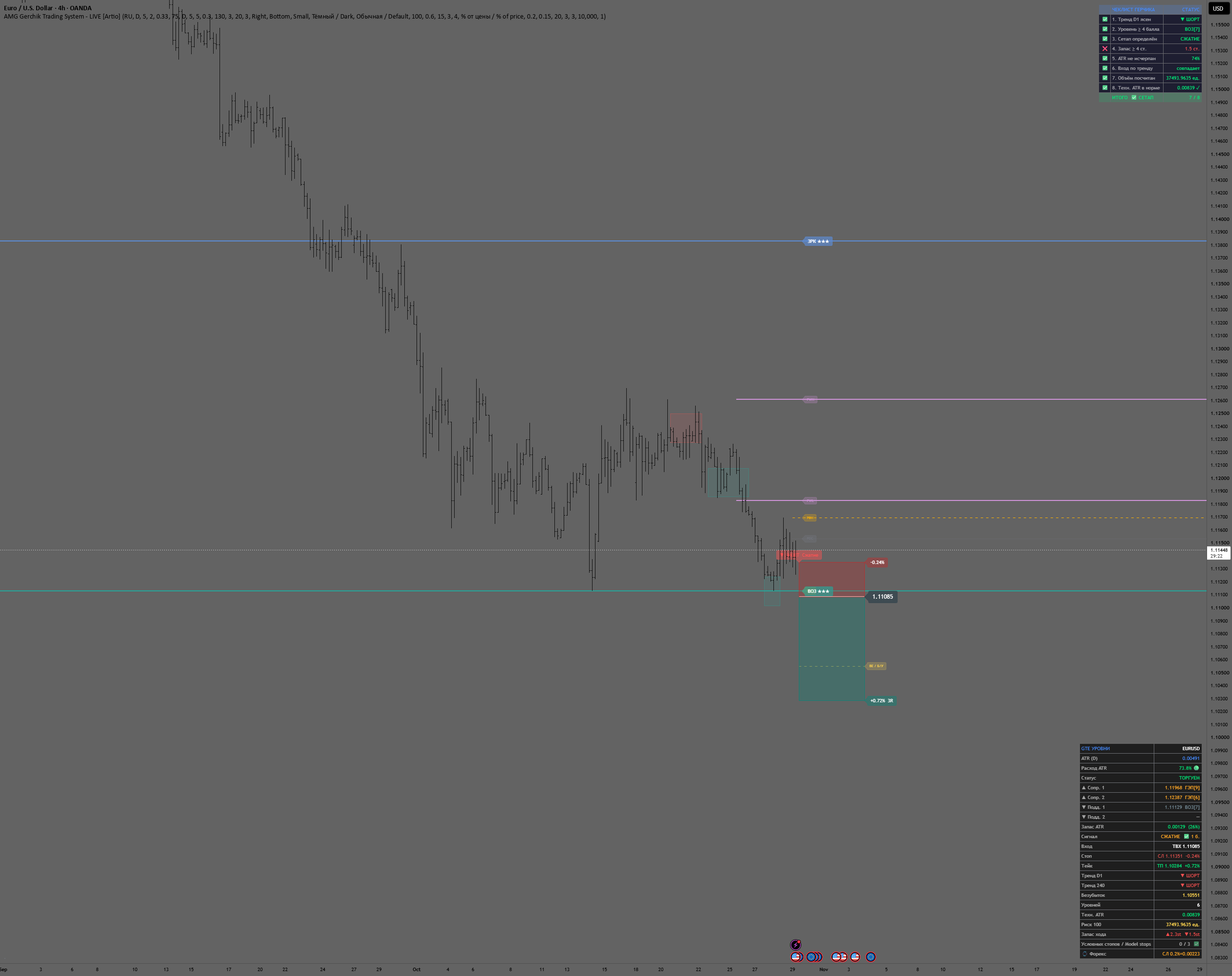
Actual interface. Open the full-size image to inspect its labels. The captured quotes are historical; this is not a trading result.
ARTIO / CAPABILITIES
Confirmed levels are classified into structural, mirror, historical, gap and other types. A strength score adds the context of repeated tests and false breakouts to each line.
First retest, a confirmed bounce, range compression and a false breakout. Conditions are evaluated on completed candles so you can inspect each setup in context.
Custom ATR analysis, daily range consumption, prior-day and prior-week references, plus daily and local trend context. See price in relation to the movement already used.
Hypothetical entry, stop and target levels with a simplified position-size estimate. The target uses the displayed entry-to-stop distance; the default 3R setting is adjustable.
A checklist brings together trend, level quality, setup availability, distance to the next level and ATR conditions. Alerts bring selected events back to your attention.
ARTIO / WORKFLOW
DATA / CONTEXT
Read the output with its feed, confirmation timing and model limits in mind.
ARTIO / FAQ
The same answers are available in the shared help centre.
This specific TradingView publication is currently free to use with protected source. A planned commercial edition and code rights are separate offers; code purchasing is not enabled on this page.
Open answer ↗No. A marker identifies a chart setup. Displayed entry, stop and target levels are analytical references; the indicator does not connect to a broker or submit orders.
Open answer ↗No. It shows how the situation matches selected conditions. It is not a statistically validated probability, confirmation of execution or promise of an outcome.
Open answer ↗Open the official publication with the TradingView button, sign in and select Use on chart or add the script to your favourites. On your chart, find it under Indicators → Favorites. Individual scripts may require a particular TradingView plan or data feed; check the product limitations.
Open answer ↗Source packages and source-code purchases are not connected on ARTIO yet. Open-source publications expose their code in TradingView’s Source code tab. Protected scripts keep their code private even when use is free. Terms for separate code delivery, modification and redistribution must be published before purchase.
Open answer ↗ACCESS / SOURCE
This publication keeps its source private. Free use of the indicator does not grant access to its code.
Separate source packages and purchase or download terms on ARTIO have not been published yet.
AMG LIVE on TradingView is a free indicator with protected source. ARTIO AMG Scalper for Windows is a separate application with its own capabilities, modes and access terms. AMG Scalper / Windows ↗
ARTIO / READ THE MARKET
Combine scanners, levels, volume, CVD, OI and funding: a practical guide with actual charts in the ARTIO Blog.
Read the indicator workflow guide ↗