

Spotting a move is one job. Managing an open trade is another. While price changes, a trader needs to keep the setup, size, intended ticket and next action in view. Searching for a control at that moment is extra work paid for with attention that could be on the market.
ARTIO IMPERATOR MTC is built around the whole manual trade. This Master Trading Console runs inside MetaTrader 5, bringing entries, eligible positions, partial exits, chart hotkeys, macros and management presets into a native console. One EX5, without DLLs or a separate companion application. You make the decisions; IMPERATOR gives those decisions an organised workspace.
Explore the IMPERATOR MTC product page for interface detail and access terms. Here, we look at the everyday scalping workflow and why useful control begins well before pressing Buy.
A scalper needs the whole trading workflow.
Judge a trading desk by what happens after entry. How do you locate the intended position? Reduce its size? Select management? Know which positions a group command targets? Understand what remains active when the console is switched off?
When these answers are scattered across windows and habits, the trader has to rebuild the sequence each time. IMPERATOR brings execution into a console while analysis stays on the charts. Market and limit Buy/Sell, volume presets, eligible ticket cards and management commands share one working context.
That is the practical value for active manual trading: understand and prepare the controls before the trade demands them. The program does not select a profitable direction for you or turn a discretionary method into a proven automated strategy. It provides a deliberate set of controls for your own decisions.
ACTUAL NATIVE UI · EN · DISCONNECTED QA
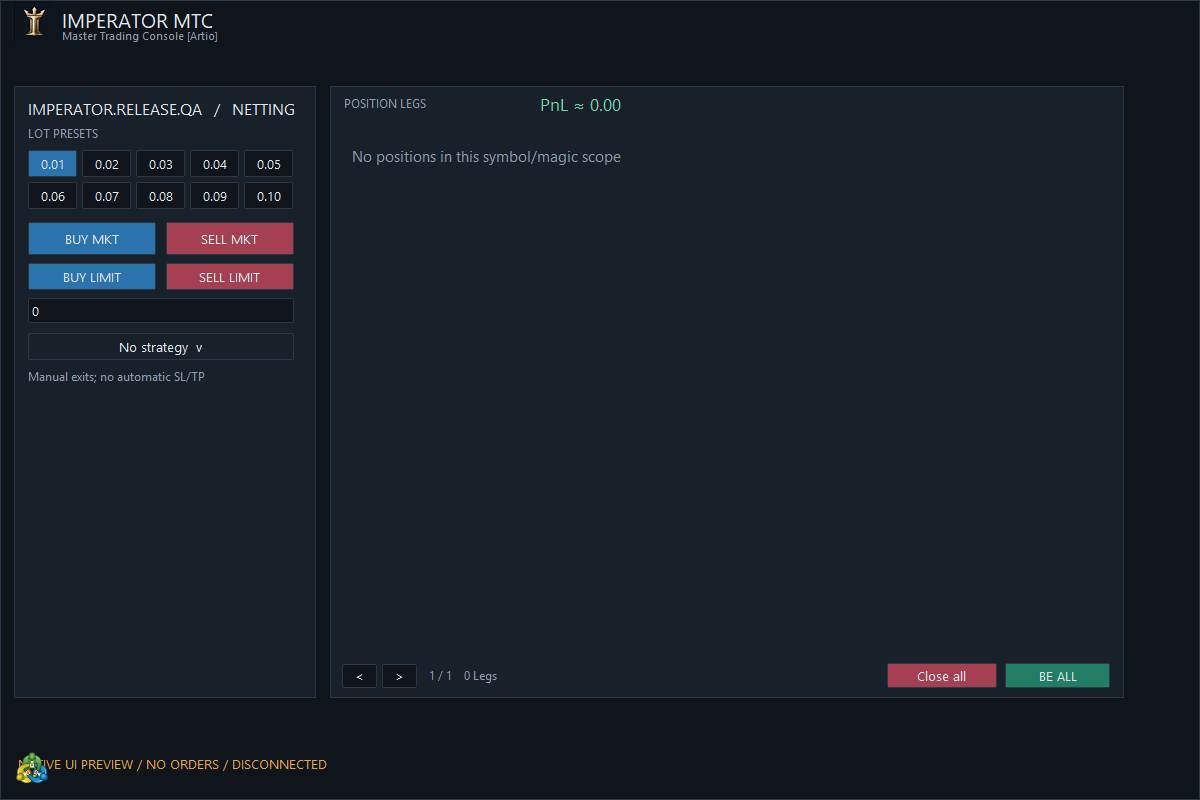
Gold scalping: keep attention on the position.
When working with XAUUSD, you want to follow movement, understand your exposure and find the intended action without a long search through the interface. IMPERATOR offers a way to organise that workflow inside MT5 itself.
Prepare the size values you use. Check your broker’s exact gold symbol, including the suffix: XAUUSD, XAUUSD.s and another broker name are not interchangeable assignments. Choose a management preset if the trade requires one. On demo, establish which positions fall within the console’s scope. The trading panel then becomes part of preparation rather than another unknown during a move.
Convenience does not remove execution constraints. Spread, slippage, tick value, permitted volume, market sessions and SL/TP restrictions depend on the broker and instrument. IMPERATOR does not promise universal gold-broker compatibility or a particular fill speed. Candidate 1.013 still requires separate broker acceptance.
ACTUAL NATIVE UI · EN · DISCONNECTED QA
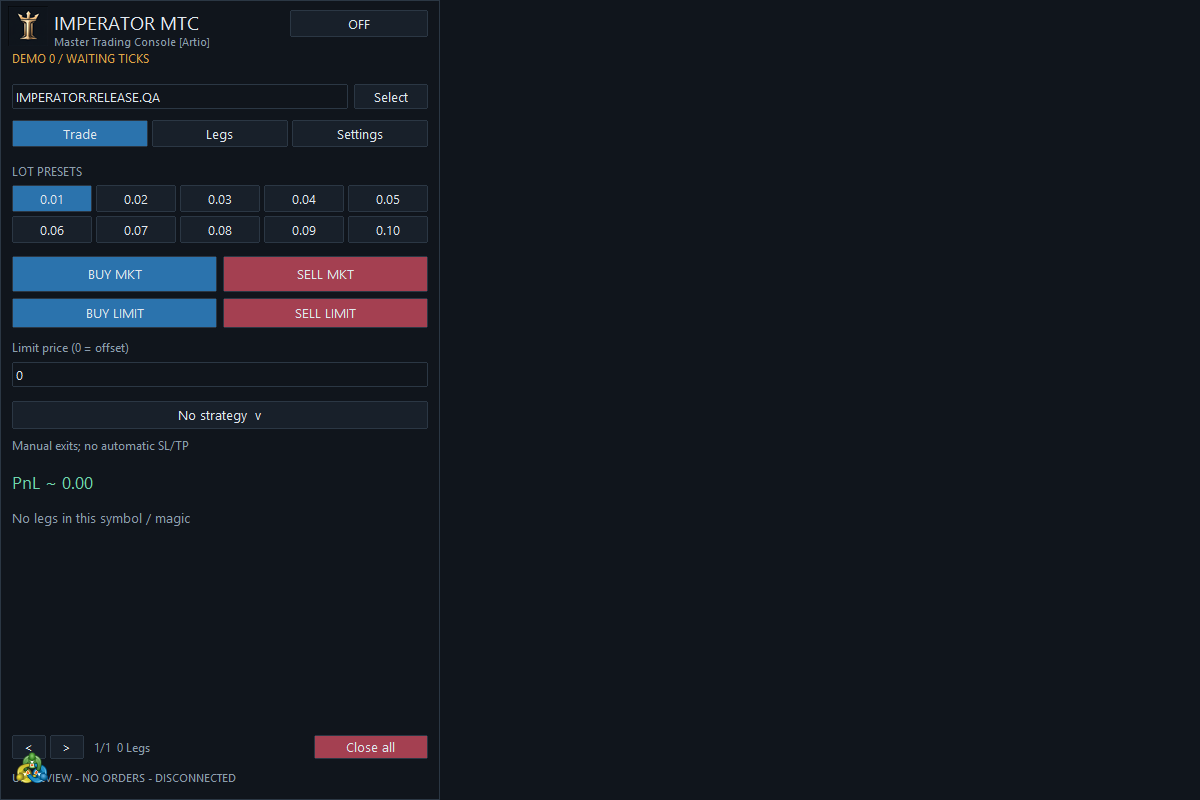
One native console inside MetaTrader 5.
IMPERATOR installs as a native auxiliary trading EA. Its core workflow needs no external Windows companion, DLLs or separate relay installation. Full and compact views let you prepare the detailed configuration and then keep a smaller execution console beside the analysis.
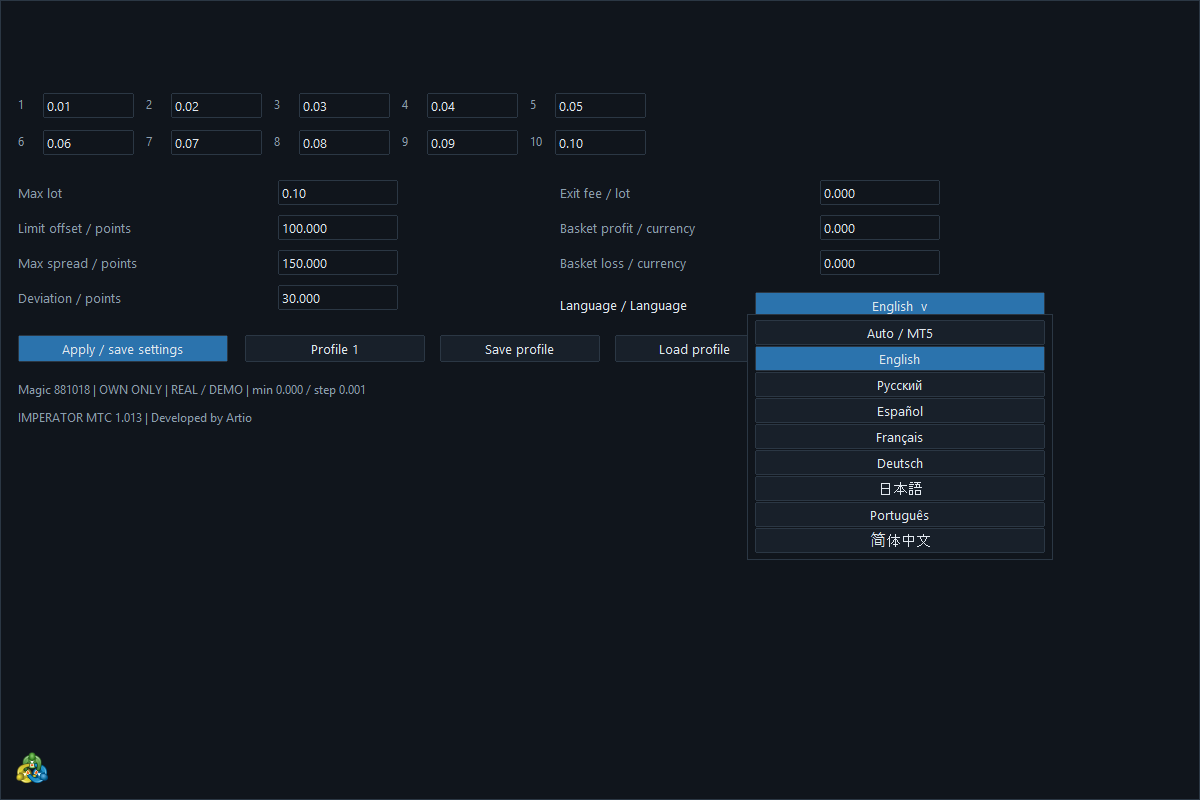
Ten volume presets hold the size choices relevant to your process. Five workspace profiles help organise configurations. Eight languages and an automatic MT5-language option support setup, although user-defined preset names and some technical messages do not translate automatically.
The images in this article show the actual English-language 1.013 interface in a disconnected QA environment. Empty position areas have not been filled with invented trades or repainted controls. They let you inspect the software’s interface; they do not establish broker execution and are not a trading track record.
ACTUAL NATIVE UI · EN · DISCONNECTED QA
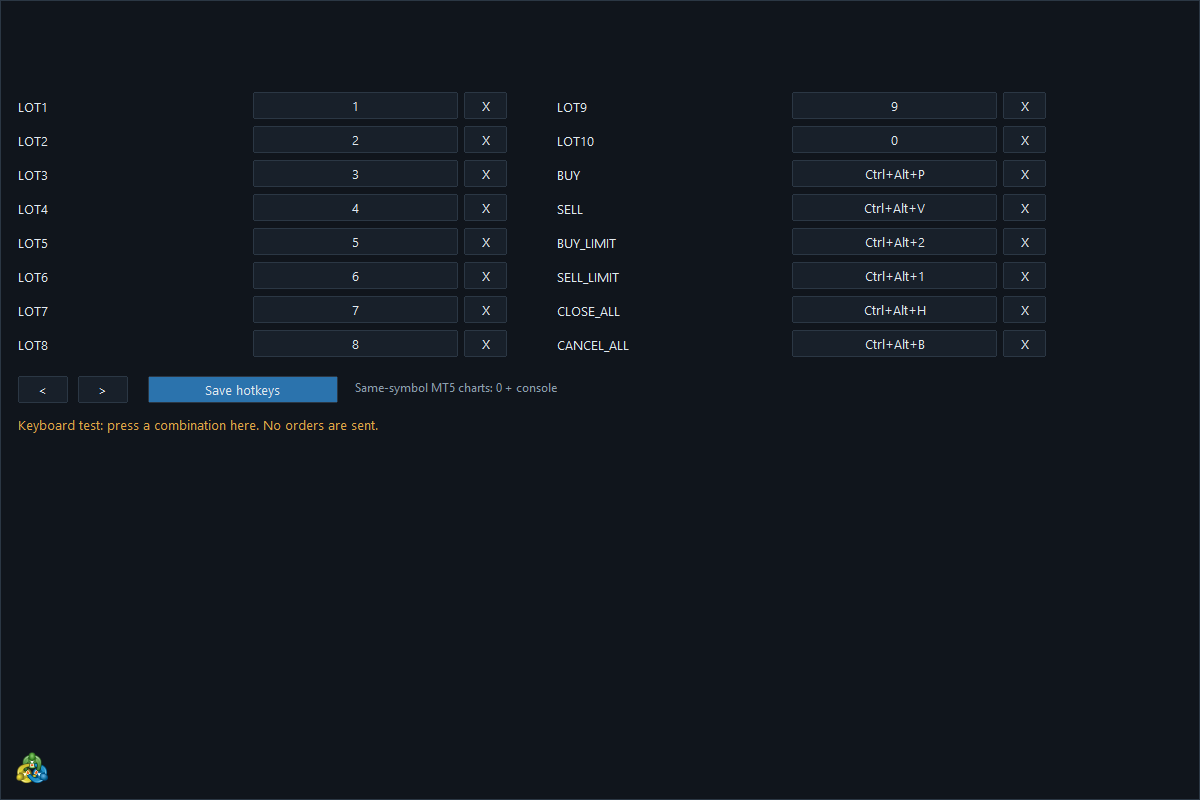
Chart hotkeys with a defined working context.
A shortcut is useful when its action and scope are clear. IMPERATOR supports configurable bindings, while the diagnostic tab lets you check input without execution. You can establish that the intended command is recognised before proceeding to a separately authorised demo order check.
Keys work in the console and eligible charts of the exact broker symbol. The embedded relay supports up to 32 such charts. This keeps analysis in MT5 and makes the prepared controls available in the intended context. It does not turn them into global shortcuts for every Windows application.
The practical order is straightforward: select the symbol, assign memorable commands, check them in diagnostics, then separately validate the permitted demo workflow. Avoid assigning several trading handlers to the same keys. Physical keyboards, layouts and display scaling need their own acceptance; recognising a key does not itself prove that a broker executed an order.
Position management starts with an identified ticket.
IMPERATOR displays eligible position cards with ticket, size and estimated open PnL. For a scalper, the connection between the visible position and the next command matters. A 25/50% partial close, estimated breakeven, reverse and hedge are specific supported actions, each with its own conditions.
Symbol and magic-number ownership determine the management scope. Including manual magic-0 positions is an explicit choice; positions belonging to other EAs are not automatically available. A partial exit can be refused if the closing size or remaining size conflicts with the broker’s minimum and volume step.
Account type also changes the workflow. Hedging supports independent legs and hedge actions. Netting aggregates the symbol position; mixed ownership is refused. Reverse closes the leg and then attempts an opposite entry, so a failed second operation can leave you flat. Group actions execute sequentially rather than as one indivisible transaction.
These distinctions make the controls more useful to an informed trader. Before a bulk action, establish which positions are eligible and what a failure would mean. A convenient button should help you act on a known scope, not conceal the scope from you.
ACTUAL NATIVE UI · EN · DISCONNECTED QA
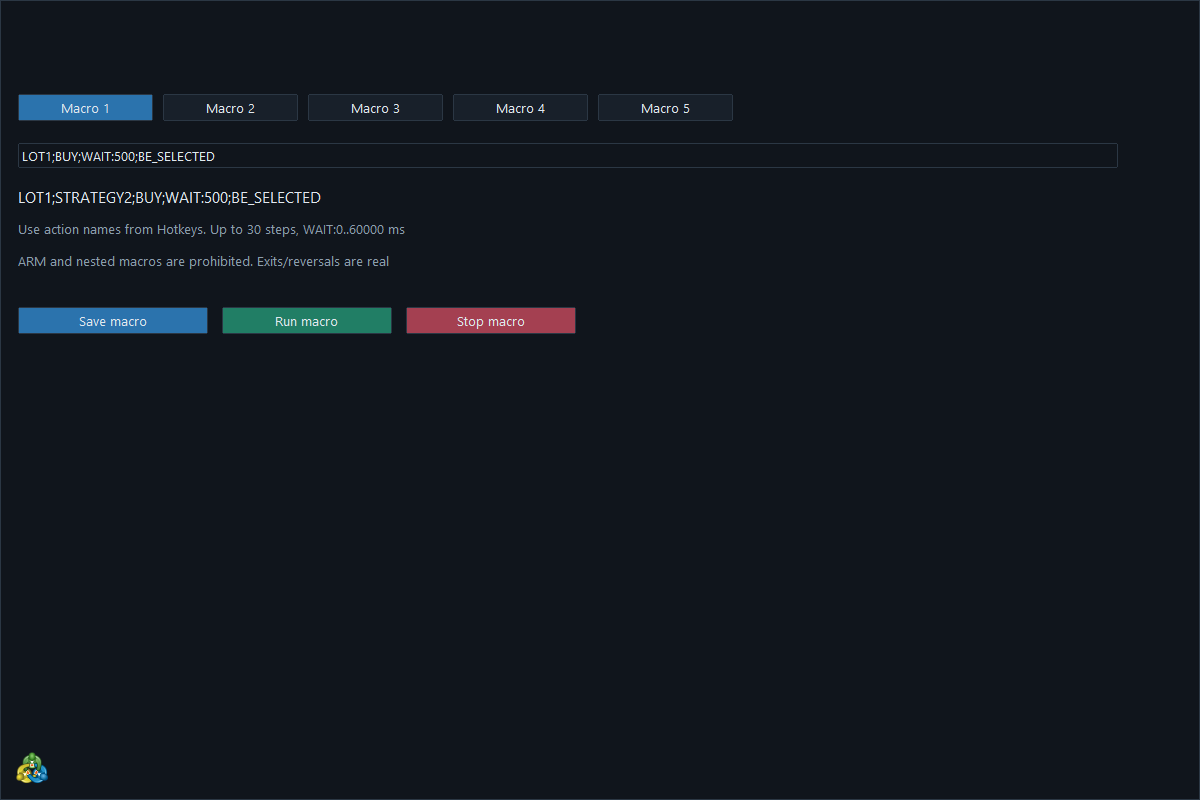
Macros: define the sequence before the moment.
A recurring process can be written once and then started deliberately. IMPERATOR provides five editable macros, each supporting up to 30 steps. Available commands and WAIT steps from 0 to 60,000 ms let you describe a sequence for your own workflow.
The value is in defining the order: a volume choice, a position command, a supported management selection. Before using a sequence, read every step, check its parameters and understand what happens if it fails. A memorable macro name is no substitute for knowing what the sequence contains.
Execution stops at the first failure. Nested macros and ARM actions inside a sequence are not supported. A macro is not atomic: steps that have already completed are not automatically rolled back. An unresolved execution state is not a reason to assume that restarting the same sequence is safe; broker reconciliation comes first.
ACTUAL NATIVE UI · EN · DISCONNECTED QA
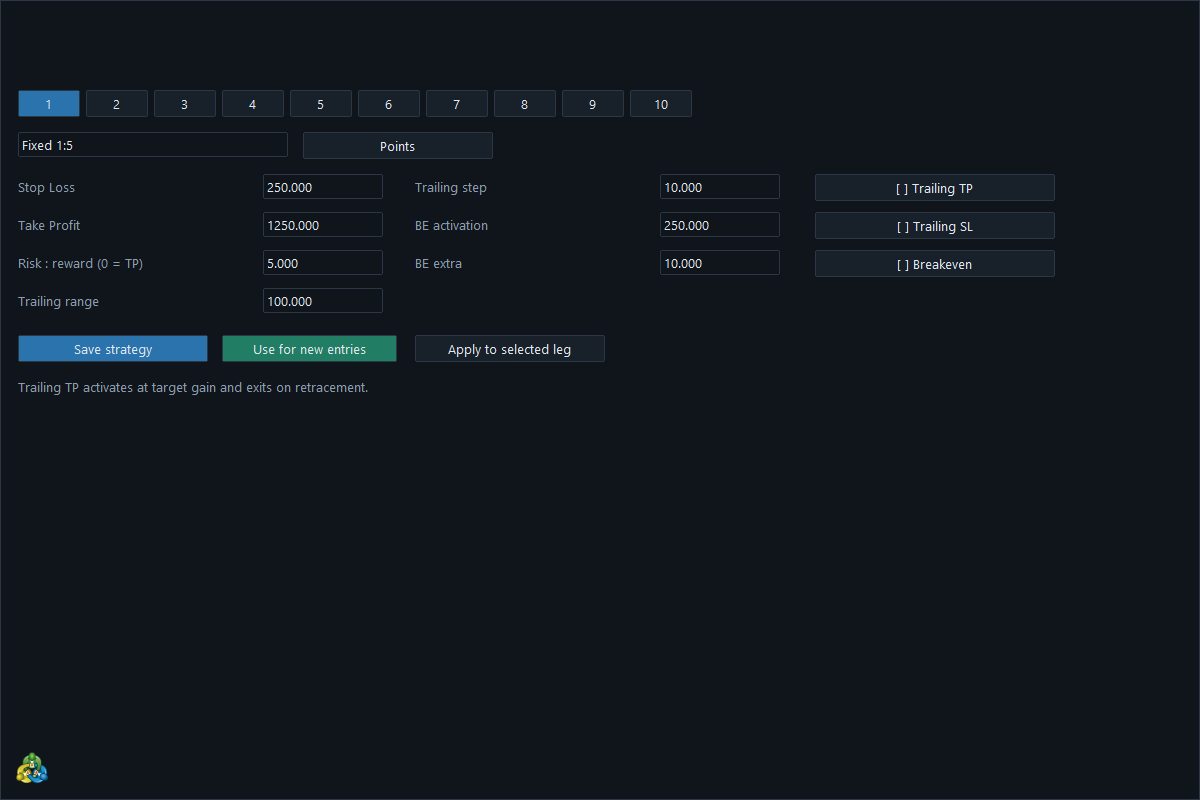
Exit presets: give the entry a management plan.
IMPERATOR offers ten exit presets covering SL/TP, trailing stop, virtual trailing profit and breakeven. A selected preset can be used for new entries; applying management to an existing eligible leg is a separate explicit action. This distinguishes the entry decision from the plan for an already open position.
One important default deserves attention. No strategy is selected initially. A new workspace starts ON but does not open trades by itself; new manual entries without a selected preset have no automatic SL/TP. Checking the exit plan belongs in preparation rather than in an assumption that protection is enabled by default.
Basket monitoring works with a snapshot of the currently eligible positions and estimated account-currency thresholds. Future entries do not automatically join that snapshot. Currency breakeven and PnL are estimates using the configured cost model; slippage and actual fees can change the realised result. Basket closing is sequential, and monitoring must be re-enabled after restart.
ON, OFF and the management rules behind them.
Escape switches IMPERATOR OFF. This stops software management and workflows, but does not close positions, cancel pending orders or remove accepted server-side SL/TP. OFF means that software management is stopped; it does not mean that the account is flat.
Virtual rules need MT5 and the EA running, an active connection and advancing quotes. They are different from a server-side stop that the broker has already accepted. After a disconnect or UNKNOWN state, reconcile orders and positions with the broker first. Restarting is not reconciliation. An unresolved intent is persisted without automatic replay.
This distinction is more useful than a sweeping claim that everything is always controlled. A trader needs to know which part of the plan runs in software, which part has reached the server and what each depends on. The IMPERATOR setup guide explains the preparation and troubleshooting workflow.
ACTUAL NATIVE UI · EN · DISCONNECTED QA
IMPERATOR or APEX: choose your control desk.
If you want execution controls inside MT5, IMPERATOR is the native option with one EX5 and chart-scoped keys. If a separate Windows window suits you better, explore APEX Scalping Terminal. They are independent alternatives, not two required purchases for one basic workflow.
Use one active trading executor at a time. Similar feature names do not imply identical implementations, start conditions or protection rules. Compare the particular work format, command scope, management behaviour and requirements of the version you intend to use.
IMPERATOR 1.013-MARKET-CANDIDATE is currently presented as a product preview. $249 once and $39 monthly are proposals, with final licensing and buyer fulfilment not yet connected. Broker acceptance, physical input, protected installation and MQL5 Market publication remain separate unfinished checks.
Your decision deserves a dedicated console. Explore IMPERATOR MTC and the actual software captures. Assess the whole workflow you will use after entry, as well as the entry itself.