Market and coin, side by side
MARKET and COIN cards compare 15-minute changes, advancing and declining eligible alts, and the asset’s strength against the same basket.

ARTIO / TRADINGVIEW / Crypto market activity
Crypto Regime Desk
One chart cannot show the breadth of a move. Crypto Regime Desk connects your coin with BTC, ETH, SOL and a selected altcoin basket through relative strength and correlations.
Open on TradingViewFree on TradingViewProtected source
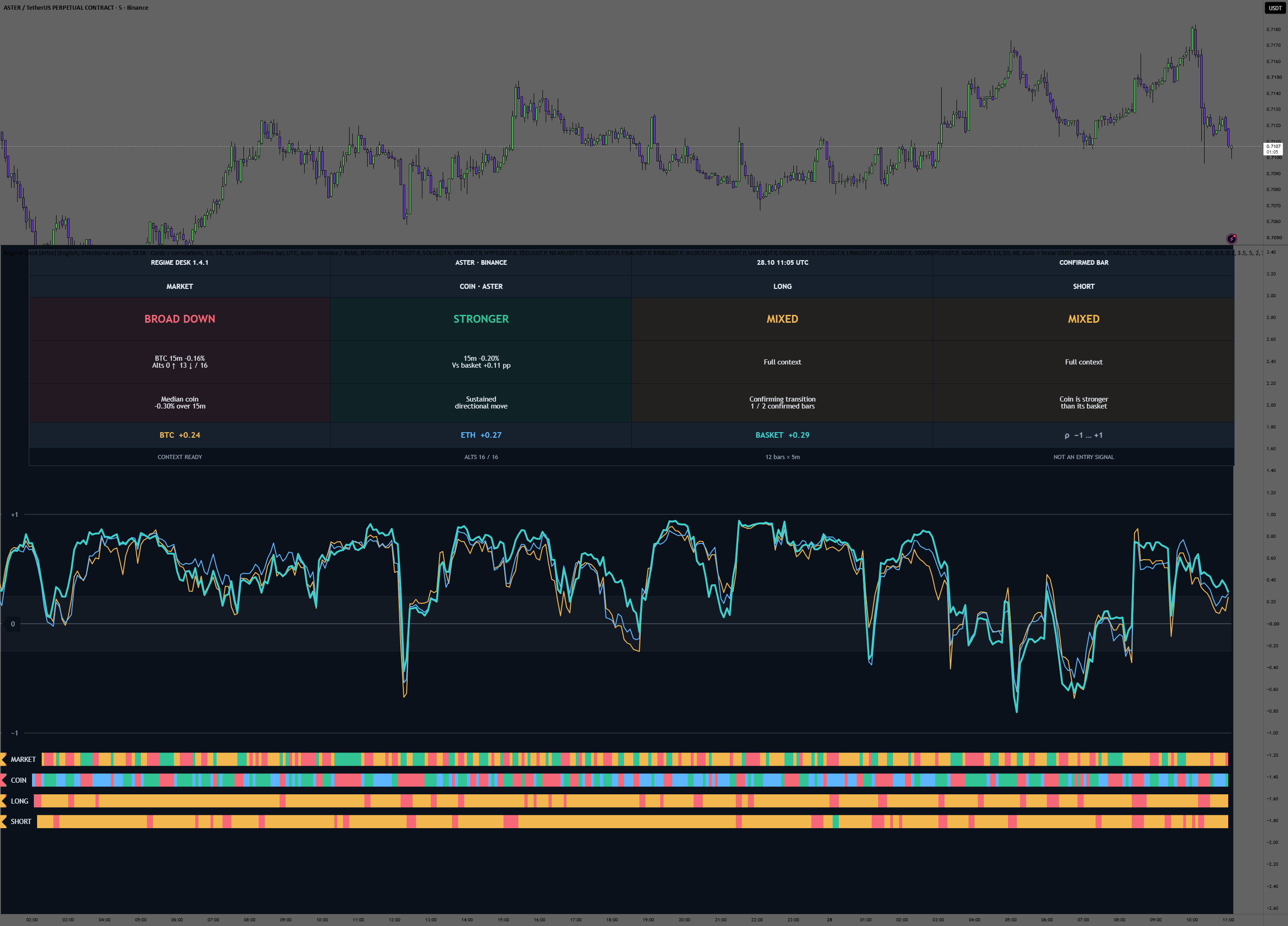
Market and coin, side by side
A basket with explicit rules
Correlations of returns
ARTIO / A PRACTICAL USE CASE
MARKET and COIN cards compare market participation with the selected instrument. Switch between DESK, CORRELATIONS, PERFORMANCE and BASKET to inspect the overview, relationships, common starting point and actual basket composition.
WHAT TO CHECKPARTIAL/NO DATA remain visible; SUPPORT is not a success probability and pair estimates exclude costs.
ARTIO / CHART STUDIO
Actual interface. Open the full-size image to inspect its labels. The captured quotes are historical; this is not a trading result.
ARTIO / CAPABILITIES
MARKET and COIN cards compare 15-minute changes, advancing and declining eligible alts, and the asset’s strength against the same basket.
Up to 16 configurable candidates, equal weights and history/estimated-turnover eligibility checks. Membership is reviewed around the UTC-week boundary and held between reviews.
Compare synchronized log returns with BTC, ETH, SOL and the basket using correlation lines and historical state ribbons.
DESK combines cards and lines; CORRELATIONS focuses on relationships; PERFORMANCE compares moves from a common anchor; BASKET explains members, weights and exclusions.
A separate mode tracks a specified LONG/SHORT pair, relative performance and a price-based mark-to-market estimate before costs. The user chooses the pair.
ARTIO / WORKFLOW
DATA / CONTEXT
Read the output with its feed, confirmation timing and model limits in mind.
ARTIO / FAQ
The same answers are available in the shared help centre.
No. The current TradingView page labels it Protected script and separately allows free use. Permission to use the indicator and permission to read its source are different.
Open answer ↗Agreement among defined context observations for studying that side. It is neither an entry instruction, a measured trade probability nor automated risk control.
Open answer ↗Check BASKET: the desk needs history, eligible candidates and continuous data for accepted members. Insufficient coverage is shown explicitly instead of being filled with substituted data.
Open answer ↗Open the official publication with the TradingView button, sign in and select Use on chart or add the script to your favourites. On your chart, find it under Indicators → Favorites. Individual scripts may require a particular TradingView plan or data feed; check the product limitations.
Open answer ↗Source packages and source-code purchases are not connected on ARTIO yet. Open-source publications expose their code in TradingView’s Source code tab. Protected scripts keep their code private even when use is free. Terms for separate code delivery, modification and redistribution must be published before purchase.
Open answer ↗ACCESS / SOURCE
This publication keeps its source private. Free use of the indicator does not grant access to its code.
Separate source packages and purchase or download terms on ARTIO have not been published yet.
ARTIO / READ THE MARKET
Combine scanners, levels, volume, CVD, OI and funding: a practical guide with actual charts in the ARTIO Blog.
Read the indicator workflow guide ↗