
Spotting a coin that has already moved is easy. The harder part is having a plan: where to wait for an entry, how to limit risk and how to exit. Preparing for crypto prop adds programme rules and loss limits to that task. Opening another dozen charts does not settle those questions.
ARTIO Momentum Radar gives you a shorter route from an interesting event to a detailed investigation: a crypto screener, a Paper-strategy catalogue, model settings and trades, then your own Bybit Demo evaluation. See the mechanics, compare alternatives and return with a concrete question. Open the strategies to start without a payment or trading keys.
Select events and bring your research into focus
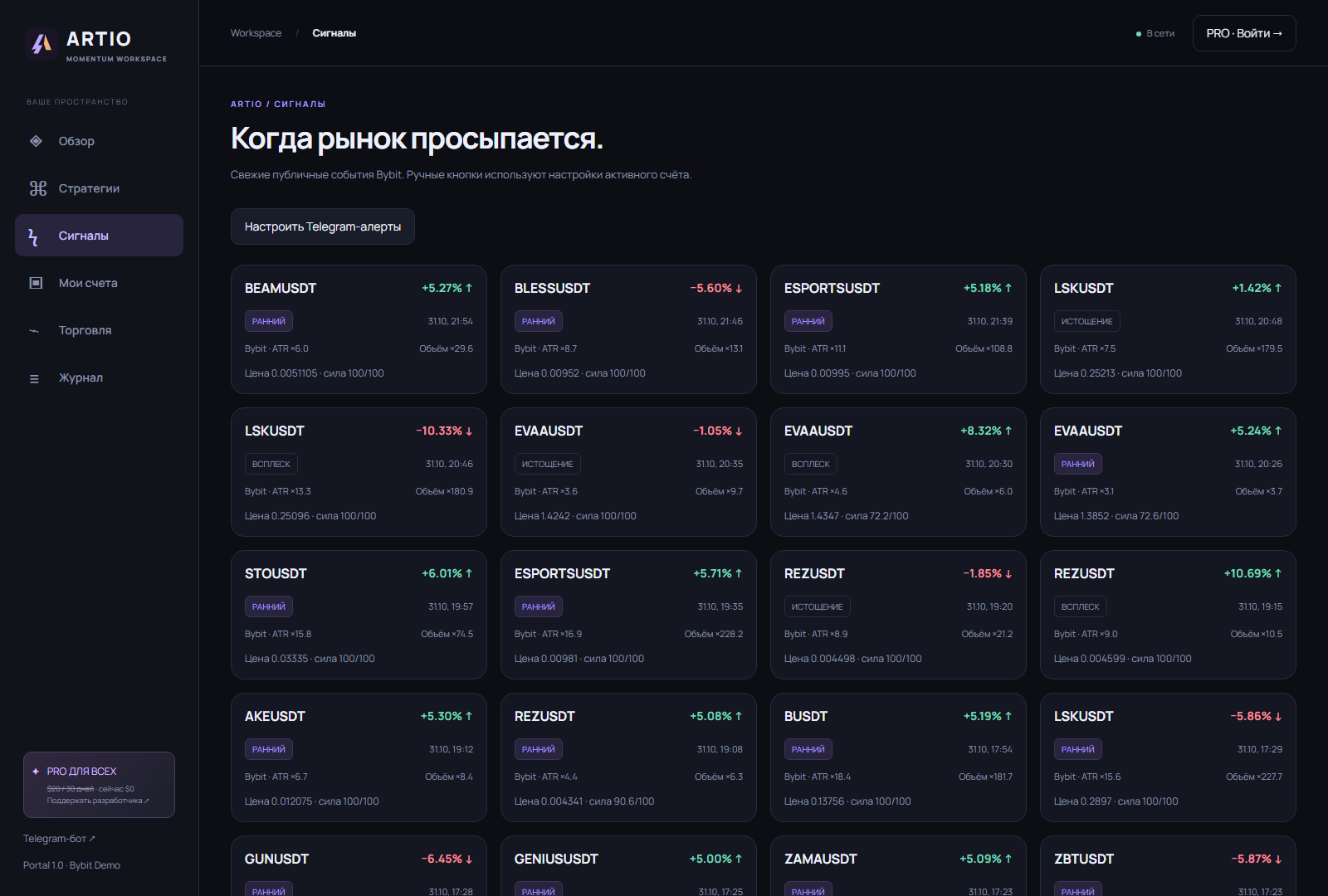
When many markets are moving, selection matters. A screener identifies an instrument worth examining; a strategy catalogue helps answer the next question: how could you investigate that kind of event?
An early burst and a confirmed impulse have different starting conditions. Following a move and working against it also express different hypotheses. ARTIO separates these choices so you can compare meaningful groups and spend more time understanding selected setups.
Telegram provides a convenient route back to an event. The web workspace gives you room to investigate it. Open the feed, find an interesting episode and explore the models built around that type of activity.
Find a strategy whose mechanics you can explain
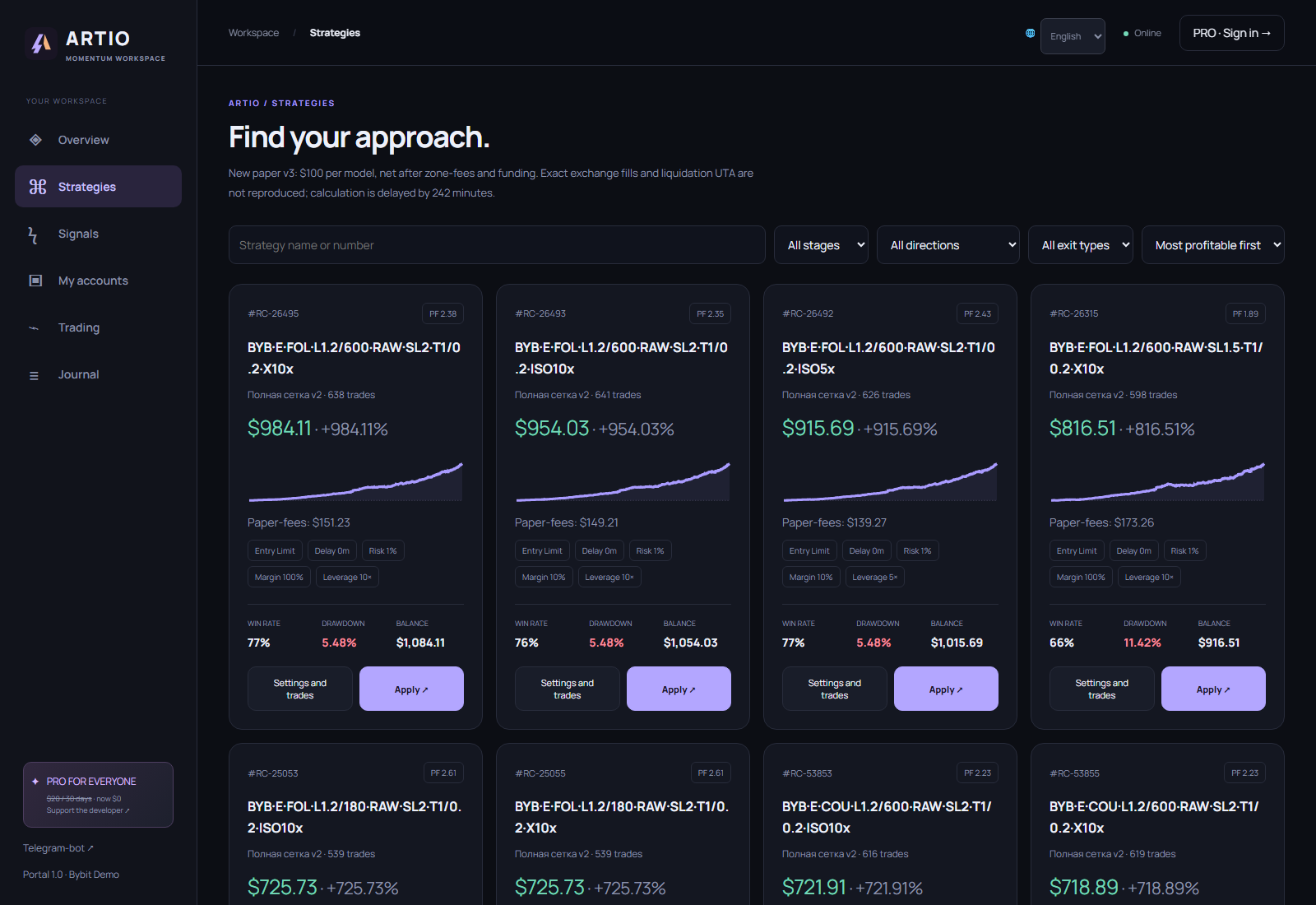
Strategies includes filters for early and confirmed events, movement with or against the impulse and different exit methods. Fixed take profit, trailing, partial closing and breakeven let you investigate different ways of managing a position.
Sort by result to examine the research lab’s leaders, then switch to drawdown or Profit Factor. How does the shortlist change? What does a model give up to produce its result? How many events underpin it?
Each card shows entry mechanics, delay, risk, margin, leverage, trade count and Paper balance. Settings and trades opens the details. Choose a few neighbouring variants and investigate what separates them. Keep their model numbers for your next comparison: a specific card makes the discussion much clearer than a remembered percentage.
PAPER RESEARCH · not a client or prop-account return
Read the result through settings, fees, net and trades
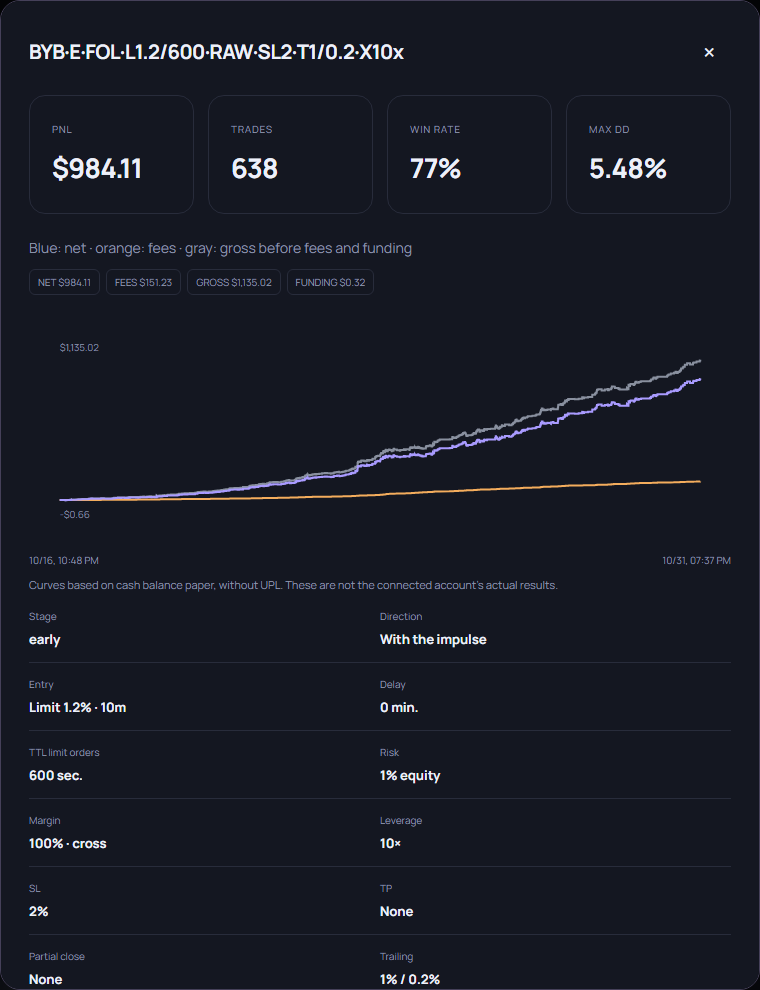
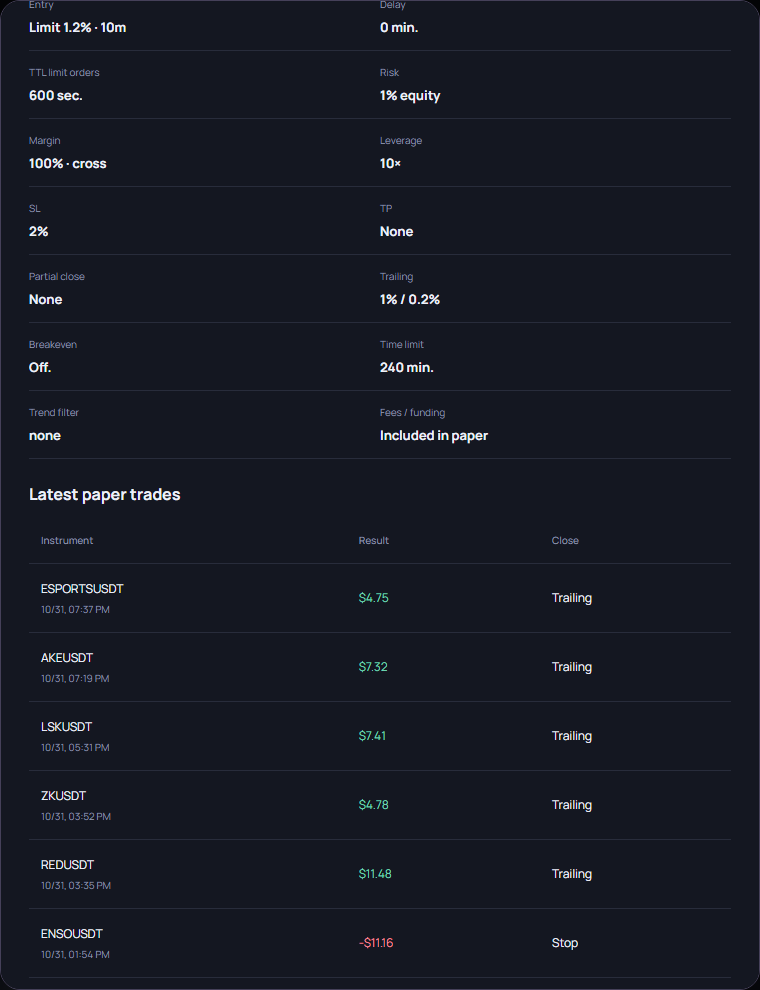
A headline result becomes more useful when its components are visible. ARTIO’s Paper cards show net results and fees; the model accounts for funding. Details expose entry conditions, limit-order waiting time, stops, exits, partial closing, trailing, breakeven and recent virtual trades.
Examine several features together:
- What entry mechanics and waiting conditions produced the result?
- How do trade count, fees, net results and drawdown relate?
- Which closing reasons appear in individual events?
- How do neighbouring models with similar settings behave?
You are looking for a process you can investigate. Two models might finish near the same total while using different exits and incurring different costs. Those differences deserve attention before settings are transferred.
Paper v3 starts with $100 per model and reports net after modelled fees and funding. At capture time the interface stated a 242-minute calculation lag; exact exchange fills and UTA liquidation are not reproduced. These figures describe a simulation, not the return on your account.
PAPER RESEARCH · not a client or prop-account return
Your Bybit Demo account, with separate profiles
After exploring a model, you can move to your own Bybit Demo Futures workspace. Connected accounts have their own settings, and manual and automated profiles are separated within the selected account. That makes the evaluation easier to organise: you can distinguish your decisions from a formalised scenario.
Model transfer includes a preview of parameters, a before-and-after comparison, blockers and the chosen transfer mode. Exact transfer and adaptation of leverage and margin are explicitly separated. The original Paper result is not recalculated for an adapted configuration.
applying settings leaves automation off until it is enabled separately; incompatible plans are blocked. The current account workspace is for Bybit Demo Futures. Order execution and position management require verification on the particular account and in its journal. Connecting an account does not establish trading effectiveness.
PAPER RESEARCH · not a client or prop-account return
Preparing for crypto prop? Understand how loss is measured
Useful preparation includes being able to explain your strategy, costs and risk constraints. ARTIO helps investigate those foundations. Paper statistics and a prop account’s rules still need separate interpretation.
Here, Paper drawdown refers to cash balance without unrealised PnL from open positions. A programme’s intraday loss limit may use equity including floating results, its own reference balance and a particular reset time. A small MAX DD on a card therefore does not establish compliance with a daily limit.
Consider a hypothetical open position moving into a loss. Cash balance can stay unchanged while equity has already declined. Those figures cannot be compared as the same metric.
Before an evaluation, write down exactly what the chosen programme restricts: daily loss, total drawdown, open risk and permitted decision methods. Your research then has a concrete purpose: examining behaviour that matters under those conditions.
Which prop programmes use Bybit Demo?
A reference to Bybit Demo does not establish a programme’s account conditions. Check official sources, the account type, evaluation stage and current rules. The comparison below provides links and restrictions as a starting point to verify before any connection.
ARTIO does not claim an approved integration with the listed prop programmes or sell their challenges. API access does not permit a bot. Restrictions may also cover external signals and manual use of a third-party feed. Keep research on your own personal Demo separate from challenge participation; verify the firm’s conditions and permission before using its account with a feed, model transfer or automation.
You can begin with your own ordinary Bybit Demo: learn the workspace, inspect a model and evaluate its journal before deciding whether an external assessment format is relevant to you.
Bybit Demo in prop programmes: what is actually documented
Official-page snapshot checked on 31 October 2026, covering seven programmes. An environment-and-rules reference, not a partner list, challenge recommendation or ARTIO compatibility certification. Bot permission does not imply permission for outside signals or a second API key.
On a narrow screen, scroll the table sideways →
| Programme | Environment / API | Usage conditions |
|---|---|---|
| HyroTrader2026-10-31 | Own Bybit/BloFin Demo via API; the Hyro platform is a separate route. | Automation of your own strategy only. Purchased third-party strategies and outside signals are prohibited. |
| Mubite2026-10-31 | Own fresh Bybit Demo subaccount with read-write API. CLEO is a separate simulation. | Self-developed bots only; third-party/public bots and copy trading are prohibited. |
| Klein Funding2026-10-31 | Own Bybit Demo subaccount and read-write API; CLEO is separate. | Automated execution is prohibited. Analysis and alerts informing manual decisions are allowed. |
| Era Trade2026-10-31 | Separate own Bybit Demo subaccount/API for each challenge. | Robots, automated trade management, copying and signal services are prohibited. |
| Dolvero2026-10-31 | Own Bybit Demo; the firm monitors through read-only API. | The FAQ permits third-party bots but prohibits outside signals and copying. The specific strategy requires clarification. |
| Crypto Fund Trader2026-10-31 | Own Bybit API/subaccount and Demo are described; the complete Demo-module setup is not publicly confirmed. | Restrictions apply to HFT, arbitrage and specified EA types. Third-party strategy and additional API-connection permissions need checking. |
| Fundedbit2026-10-31 | Program's Bybit-integrated interface; own exchange login/API is not required. Own Demo API is unconfirmed. | Excluded from confirmed own-Demo-API routes. Current automation rules require another check. |
A practical route from a card to your own evaluation
Start with one question. For example, how does a model’s behaviour change with a different exit method? Filter the catalogue to one event type and direction, choose a few cards with understandable differences and open their settings.
Record the model number, parameters, review date, trade count, costs and drawdown. Examine virtual closings. Note separately which Paper assumptions need investigation on Demo. This short record helps you return to the original idea even when catalogue results change.
On your own Demo, first check the selected account and manual profile: position size, entry, stop, exit and limits. Then compare commands with positions and the journal. Change one research variable per pass so that differences remain explainable.
Return to the catalogue with the next question. The workspace becomes more useful when each comparison builds on something you have already examined. That is a practical research loop you can make your own.
Explore the strategies now: access is free
ARTIO Momentum Radar already brings the catalogue, market events, model details and your own Demo workspace into one service. Its interface has Russian and English selectors. You can begin by browsing strategies without trading keys; enter your own Demo credentials only in your personal service workspace.
Access is currently free. The creator plans a future price of $20 per month, with no announced launch date or final terms. Open the catalogue, choose a first model and examine its details. It is a manageable first step towards your own evaluation process.
If the workspace saves you time and helps organise your research, consider a voluntary donation to its developer. Support helps develop the tool and keep the project accessible. It does not buy trading results or enable execution.