
Many traders can see the line. The work is in what happens next. Price has crossed a level. Will the move continue, will it return, and have the entry conditions actually qualified? The whole sequence matters. That is where AMG begins.
ARTIO AMG Scalper gives the method a dedicated workstation. Levels, trade flow, the order book, strategy profiles, risk limits and the decision journal share one Windows environment. You define the setup and its boundaries, select a mode and inspect which condition makes the system wait or act.
This is the workflow around a level, from observation to execution checks. Explore the actual AMG Scalper screens, then examine two scenarios that can start with the same outward move while requiring different rules.
Beyond the level, the real questions begin.
You know the moment. Price approaches a boundary, accelerates and pushes through. The chart looks convincing. A few candles later, the outcome becomes obvious: the move either continues or falls back into the old range. The decision comes earlier, while both possibilities are still open. That is where a defined workflow matters: what confirms the setup, how much risk is permitted and what should make the system wait?
ARTIO AMG Scalper puts that workflow into a dedicated Windows workstation. Quotes and candles, levels, market-flow confirmation, strategy profiles and the decision journal sit together. You can see the active setup, configure its limits and inspect the reasons behind a decision. For a trader working around levels, that creates a practical connection between the market being watched and the conditions required for an entry. The plan has somewhere to live, and its decisions leave a trail you can review.
A decision needs a basis and a next step. Marking a boundary is not enough: you need to know which data is current, what confirms the direction and which conditions should make you skip the setup. AMG gives those questions a place in the profile and journal. The conditions stay visible even when no entry currently qualifies.
That has practical value for a trader. Instead of keeping the entire plan in memory, you can inspect the active profile, market and waiting reason. The workstation does not claim to know the outcome in advance. It lets you work through a defined set of conditions and review a specific decision after the event.
ACTUAL INTERFACE · PREVIEW.1 · PAPER
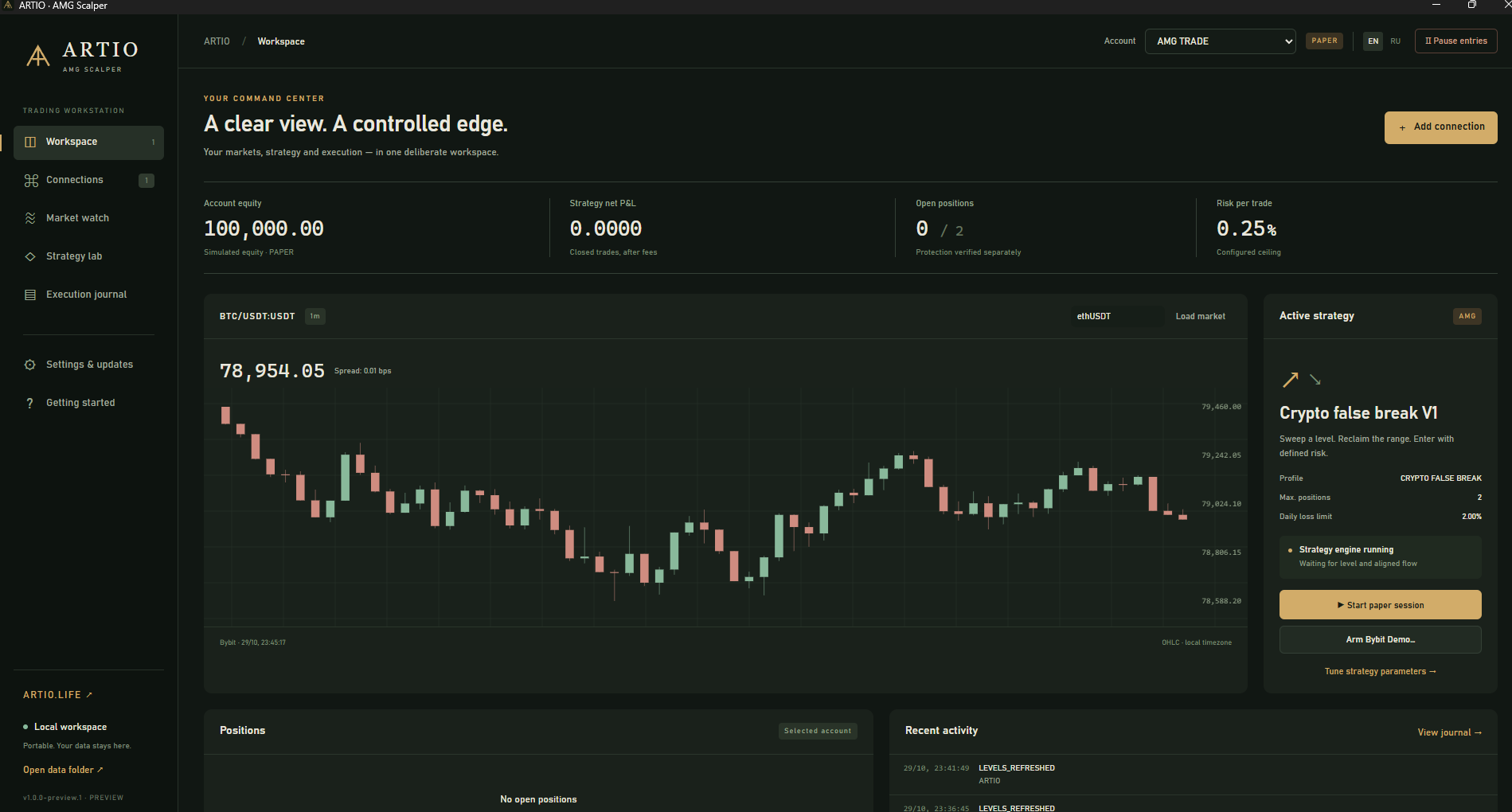
A breakout needs conditions, not just a crossing.
A continuation breakout is a move through a level that receives support in the direction of the break. A touch or brief push is only the beginning of the question. Fresh data, spread, recent executed trades and available liquidity help determine whether the conditions meet the configured rules. Similar-looking candles can arrive with very different execution conditions.
Crypto breakout V1 requires BREAKOUT confirmation for two seconds and fresh ATR from closed one-minute candles. Stop distance, risk, depth and cost checks still apply. If a hypothetical resistance level is 100, trading above 100 creates a candidate to examine; it does not automatically justify an order. This example explains the logic, not a trade signal. There is also an important detail in the preset name: Crypto breakout V1 retains classic false-break entries. You get a profile with an enhanced breakout path, rather than a switch that excludes every other entry type.
The continuation is the question, not the line crossing alone. AMG lets you compare the move with the profile’s confirmation conditions and current constraints. When confirmation does not qualify, no entry is also an outcome of the checks, rather than a reason to remove limits simply to get a trade.
The two seconds described for Crypto breakout V1 are a confirmation interval, not a promise about order submission or fill speed. ATR freshness, data and the execution environment remain separate requirements. A broad idea such as a “fast breakout” becomes a specific profile you can inspect and test.
A return into range needs its own setup.
A false break starts with a sweep beyond a boundary, followed by a return through the level. The question changes: do executed trades and the order book confirm the return? AMG separates that sequence from continuation. Evidence for a move outward cannot simply be reused as evidence for an entry in the opposite direction. The setup needs its own conditions.
Crypto false break V1 permits FALSE_BREAK only. It has its own geometry: ATR from closed one-minute candles determines the permitted stop distance, and exceeding the ceiling causes a skip. A 2R target, a nominal-size cap and a holding-time limit are specified. These are research and execution rules, not promised returns. Their value is clarity: you can inspect the geometry of the setup and decide whether it fits your intended workflow before enabling execution.
The return is a different setup, not a late continuation of the first one. A sweep followed by a reclaim of the range needs confirmation and limits that match that sequence. A dedicated profile makes the distinction explicit, instead of changing the explanation after the price move has already happened.
The preset’s 2R target is a plan parameter, not achieved performance. The actual result, costs and ability to execute need separate checks. The useful strength of the workstation is clarity: you can see which setup is selected and which boundaries apply to it.
PREVIEW.2 · BUILT-IN GUIDE
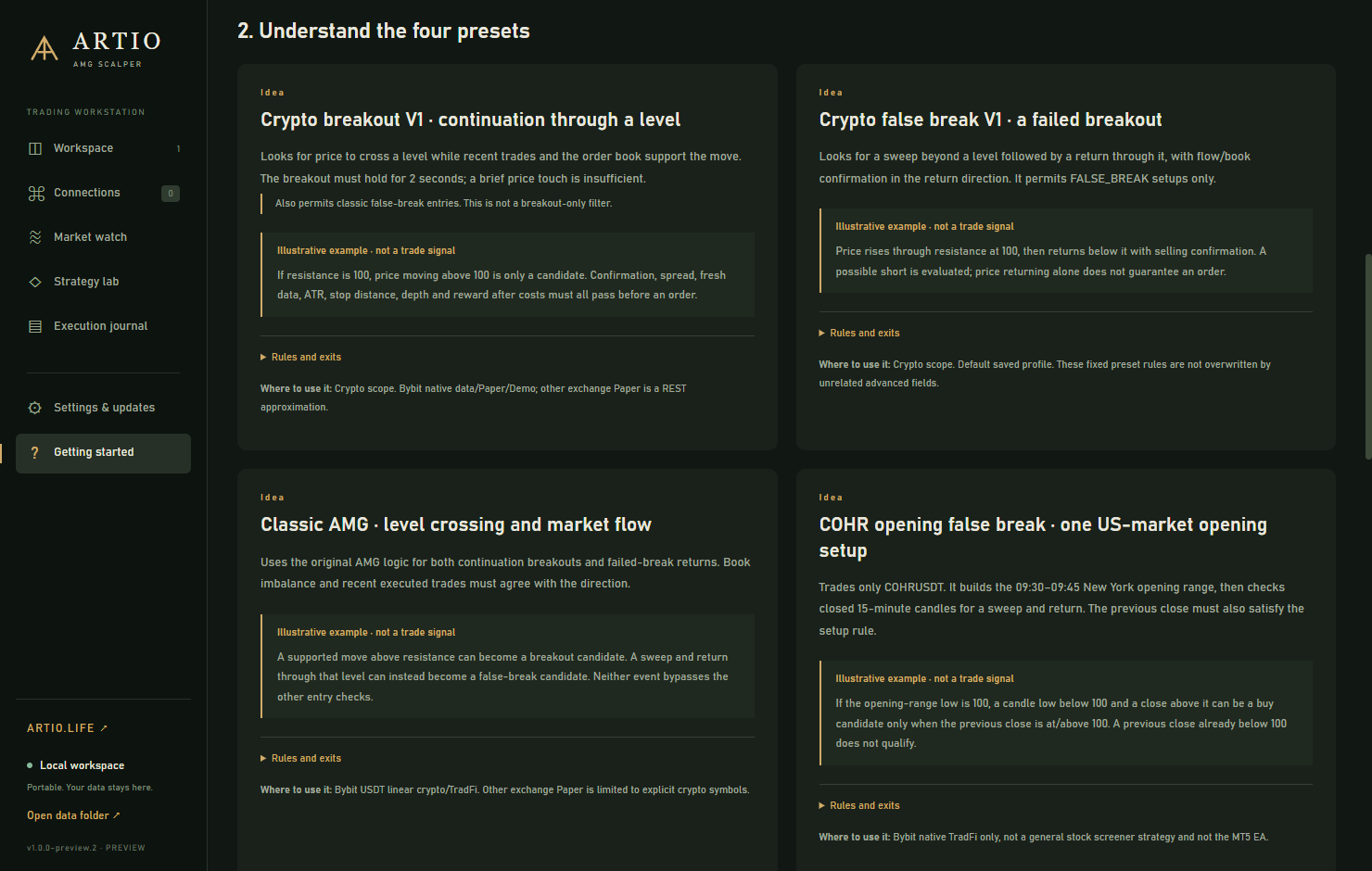
Four presets. Distinct jobs. One workstation.
Alongside the two crypto presets, Classic AMG levels & flow combines continuation and false-break logic with general parameters and early exits. For available TradFi instruments on the native Bybit path, Classic can be used with that market scope. Profiles can be saved separately and assigned to individual connections, giving different working scenarios their own settings.
COHR opening false break addresses one specific US-opening setup. It covers COHRUSDT only, builds the 09:30–09:45 New York range and checks entries from 10:00–11:00 using closed 15-minute candles and a previous-close condition. Its target is 2R, with holding time up to six hours. The included calendar covers 2026 only; later years are blocked until an update. These four names represent different operating rules, rather than interchangeable labels. Compare their purposes, markets and limits on the AMG Scalper product page before choosing a starting profile.
Risk first. A decision trail you can inspect.
Strategy lab gives per-trade risk, leverage ceiling, position count, daily loss and maximum spread their own controls. Save a profile, import settings or use the validated advanced parameters. That makes the preparation concrete: which conditions are allowed, what limits apply and which profile belongs to the selected connection. Configured limits do not guarantee the eventual loss when slippage or price gaps occur.
The journal makes the workflow inspectable. No entry? Read whether the setup is absent, data is stale, ATR is not ready, spread is too wide or size fails a constraint. An order appears? Distinguish acknowledgement from an actual fill. Pausing entries leaves position management running, while uncertain outcomes require reconciliation. This matters when you want to understand the system during a session and review it afterward. You have reasons to examine, instead of having to infer everything from a single status light.
ACTUAL INTERFACE · PREVIEW.1 · PAPER · EN
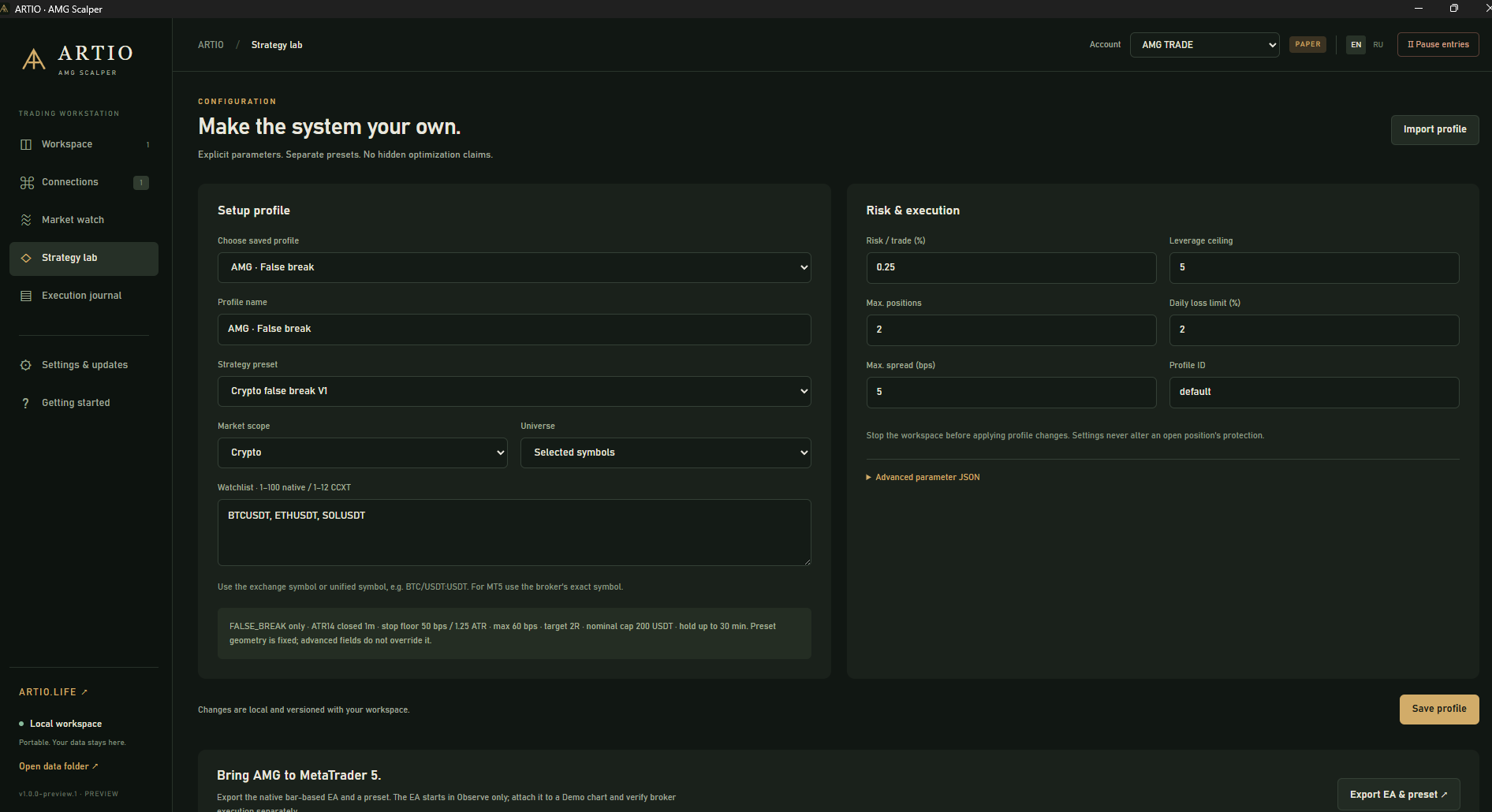
Give your method a dedicated workspace.
AMG Scalper comes as a Windows x64 portable package. Extract the complete ZIP into a writable local folder and launch the EXE; no separate Python installation is required. English and Russian are available in the interface. Public quotes need no credentials, and each connection separately identifies its venue, environment, account and assigned profile.
Settings and history stay local. Windows DPAPI encrypts credentials for the current user and computer, so moving to another Windows installation requires entering them again. The desktop engine needs the app, internet and an awake PC or Windows VPS. Updates replace the EXE while retaining the data and profile folders after reconciliation and a local backup. The product page uses real creator-supplied screenshots from the preceding preview.1 interface in PAPER mode. The simulated equity shown in those captures illustrates the workspace; it is not performance history for the current release.
Observation, Paper and Demo: a deliberate testing path.
The first workflow is straightforward: add a connection, verify it, load a market, assign a profile and begin with observation or Paper. Verifying a connection does not enable entries. Paper simulates equity, costs and fills. Bybit Demo uses a separate simulated venue environment with actual API orders and explicit arming. Buying the app does not switch either mode into Live.
Native Bybit supports up to 100 selected symbols and an automatic universe. Other CCXT adapters offer available data and REST Paper, limited to 12 selected crypto symbols per connection; a catalogue of 104 APIs is not a promise of 104 accepted live execution venues. MT5 is a separate path: export the closed-bar companion EA and preset, then configure it in the broker terminal. The four desktop strategies, order book and tape are not transferred. The setup guide explains those distinctions and the sequence for checking each environment.
Your setup. Your AMG workstation.
Assess AMG through the complete workflow. Find the selected market and active profile. Compare the four presets. Inspect the risk settings, the waiting reason and the distinction between an order acknowledgement and an actual fill. Those details make a workstation you can use deliberately.
Explore ARTIO AMG Scalper for Windows. Actual screens, modes, setup guidance, FAQ and package information help you assess it for your method.
The current release is 1.0.0-preview.2. Private Bybit Demo execution acceptance for the portable build and MT5 broker acceptance remain outstanding; desktop live orders are disabled. The price is $990 once for personal, indefinite use of the delivered version. Future releases and personal support are not promised. Payments and protected delivery are currently unavailable, so the site is not collecting money. Open AMG Scalper, inspect the package and read the FAQ. That is the next step toward choosing the right tool for your workflow.
Level. Confirmation. Control. You choose the setup. AMG gives it a workstation.