18 contracts on one board
Display 6–18 rows, select the venue and filter quiet instruments using WATCH, HOT or IGNITE states.
Опис цього продукту наведено англійською. Можна перейти на RU або EN.

ARTIO / TRADINGVIEW / Crypto market activity
Crypto Perp Pulse
A percentage gain shows what has already moved. Crypto Perp Pulse adds five-minute volatility, volume pace and the one-minute pulse of selected perpetuals.
Open on TradingViewFree on TradingViewOpen source
18 contracts on one board
Volatility meets volume activity
Use SCORE to organize attention
ARTIO / A PRACTICAL USE CASE
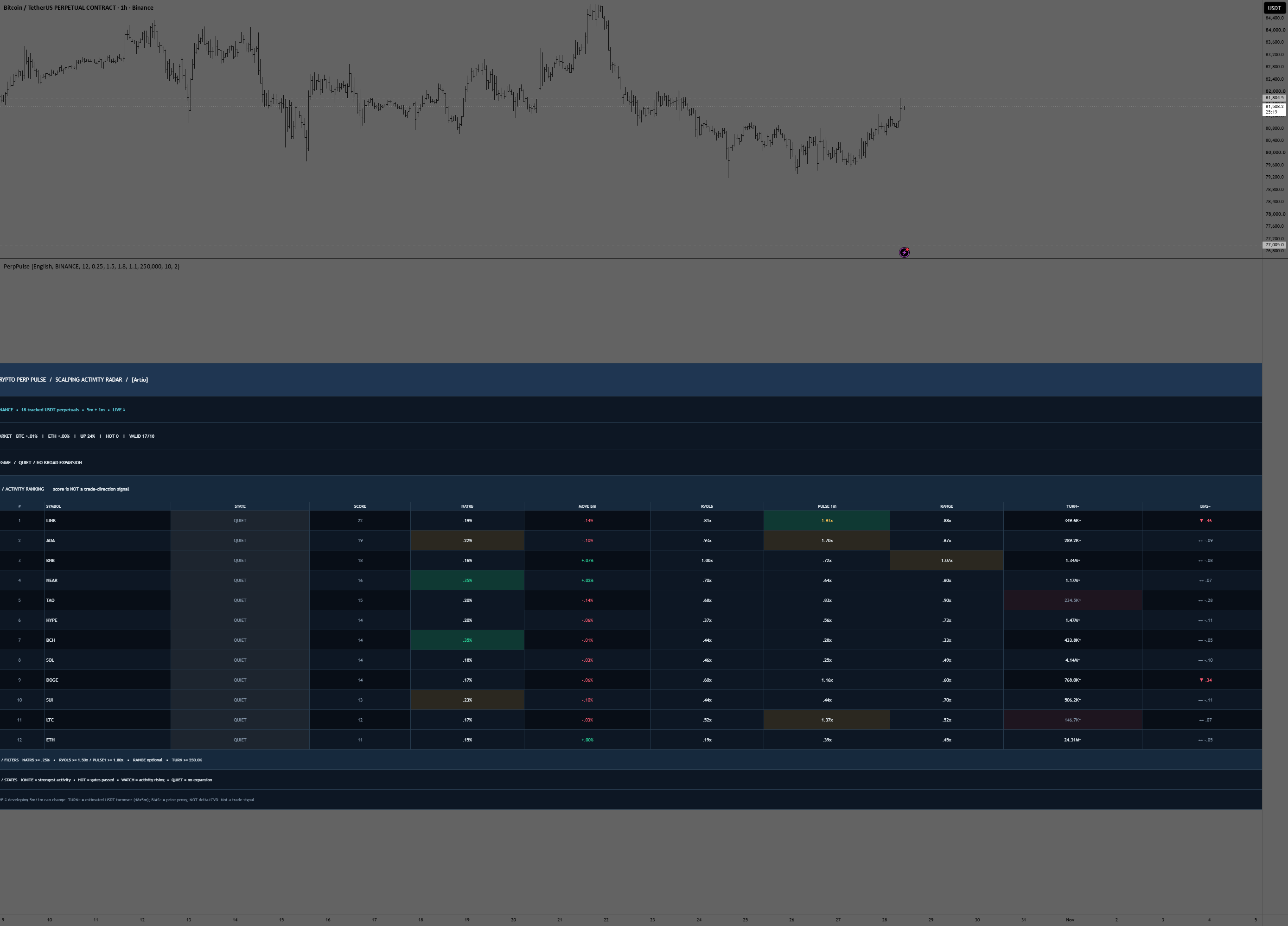
Compare up to 18 Bybit or Binance USDT contracts, their SCORE and WATCH/HOT/IGNITE states in one pane. BTC/ETH and activity breadth within the selected group keep the surroundings visible as you build a shortlist.
WHAT TO CHECKSCORE ranks activity, not trade probability; LIVE readings on developing 1m/5m candles change.
ARTIO / CHART STUDIO
Actual interface. Open the full-size image to inspect its labels. The captured quotes are historical; this is not a trading result.
ARTIO / CAPABILITIES
Display 6–18 rows, select the venue and filter quiet instruments using WATCH, HOT or IGNITE states.
NATR5, RVOL5, PULSE 1m and RANGE help separate building activity from a price move that has already happened.
The 0–100 ranking combines several activity measurements. It orders contracts for attention rather than expressing LONG or SHORT confidence.
BTC/ETH five-minute moves, the share of advancing contracts and HOT/IGNITE counts add context for the tracked group.
Set minimum NATR, relative volume, one-minute pulse and estimated turnover, with aggregate HOT-breadth and new-IGNITE notifications.
ARTIO / WORKFLOW
DATA / CONTEXT
Read the output with its feed, confirmation timing and model limits in mind.
ARTIO / FAQ
The same answers are available in the shared help centre.
No. SCORE is a relative activity ranking from 0 to 100. It provides neither trade direction nor a measured win rate.
Open answer ↗Perp Pulse monitors a selected group of 18 contracts using 5m/1m metrics and aggregate activity breadth. Rotation Radar supports configurable lists of up to 40 symbols per page, more sorting options and separate LIVE/CLOSED modes.
Open answer ↗Not necessarily. The optional range gate is off by default, so strong volume activity may appear within a contained range. It is a reason to inspect the chart, not proof of absorption.
Open answer ↗Open the official publication with the TradingView button, sign in and select Use on chart or add the script to your favourites. On your chart, find it under Indicators → Favorites. Individual scripts may require a particular TradingView plan or data feed; check the product limitations.
Open answer ↗Source packages and source-code purchases are not connected on ARTIO yet. Open-source publications expose their code in TradingView’s Source code tab. Protected scripts keep their code private even when use is free. Terms for separate code delivery, modification and redistribution must be published before purchase.
Open answer ↗ACCESS / SOURCE
The creator has published the source on TradingView. View it in the Source code tab on the publication page. No download file is hosted on ARTIO yet.
Separate source packages and purchase or download terms on ARTIO have not been published yet.
ARTIO / READ THE MARKET
Combine scanners, levels, volume, CVD, OI and funding: a practical guide with actual charts in the ARTIO Blog.
Read the indicator workflow guide ↗