CONTINUATION / BREAKOUT
A move through the level must qualify. Data freshness, trade flow and the order book form part of the profile’s conditions.
The detailed description is available in Russian and English. English is shown below.

ARTIO AMG SCALPER / 1.0.0-preview.2
Level. Confirmation. Control.
ARTIO AMG Scalper is a Windows workstation for breakouts and false breaks. Levels, trade flow, order book, four presets, risk and decision reasons in one environment. Current preview.2: observation, Paper and explicitly armed Bybit Demo. MT5 uses a separate EA.
WINDOWS x64 · PORTABLE · EN / RU
AI-generated AMG campaign artwork: a boundary, a break and a return as a metaphor for the method. Not an interface, market chart or trading result.
01 / WORKSPACE
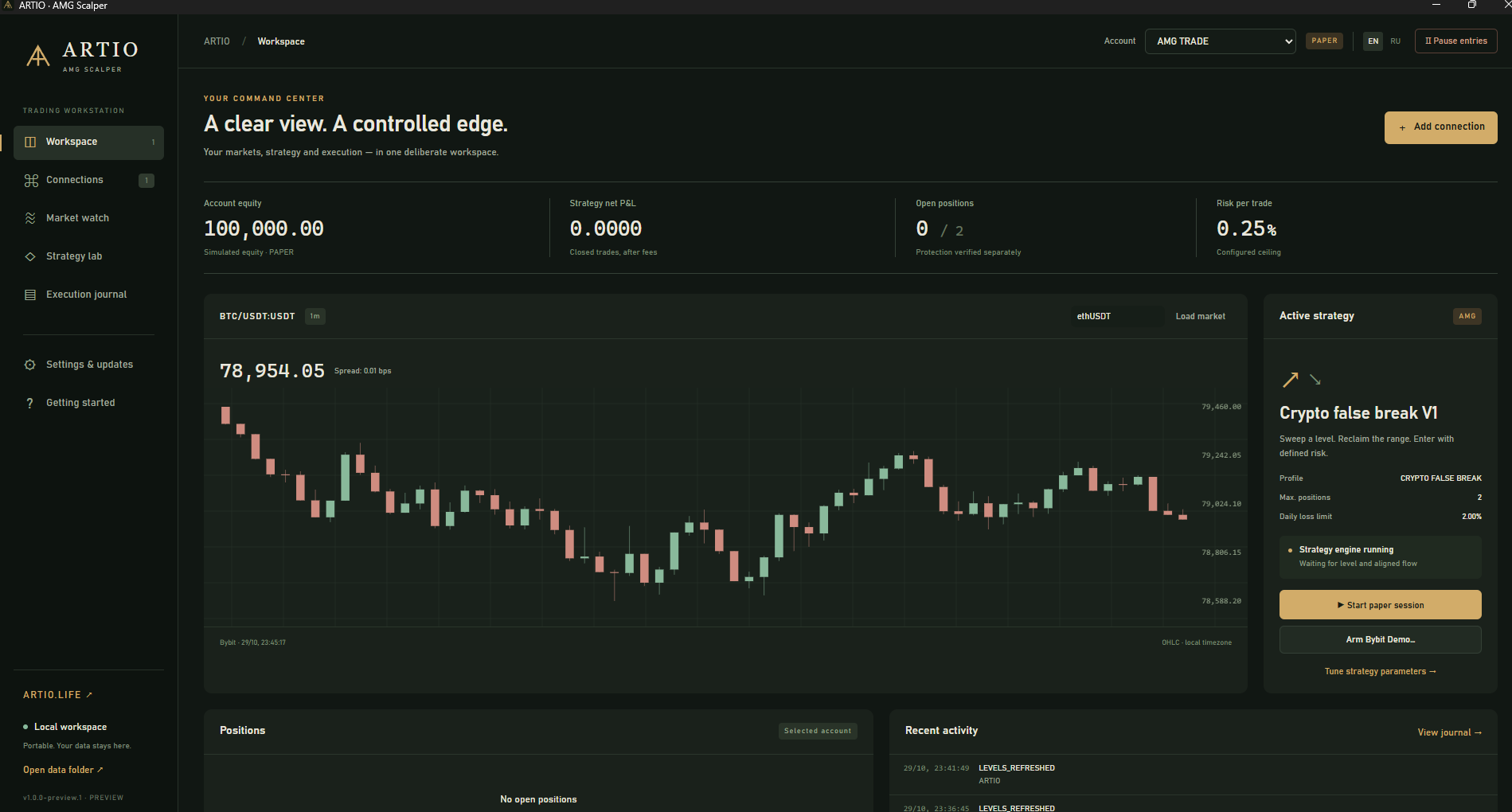
Real screenshots supplied by the creator, showing the preceding preview.1 interface in PAPER mode. Equity and results in these captures are simulated; these images illustrate the interface, not preview.2 performance.
BEYOND THE LEVEL / ARTIO
Price crosses a level. Continuation and a return remain possible. AMG brings levels, trade-flow and order-book confirmation, the risk profile and the decision trail into one Windows workstation. You choose the setup and limits; the system checks conditions in the selected mode.
A move through the level must qualify. Data freshness, trade flow and the order book form part of the profile’s conditions.
A sweep and a return into the range form a different sequence, with their own confirmation and risk profile.
01 / SETUP
A move through a level, confirmed by recent trades and the order book for 2 seconds. BREAKOUT entries require fresh ATR from closed one-minute candles. Classic false-break entries remain enabled; this is not a breakout-only mode.
02 / SETUP
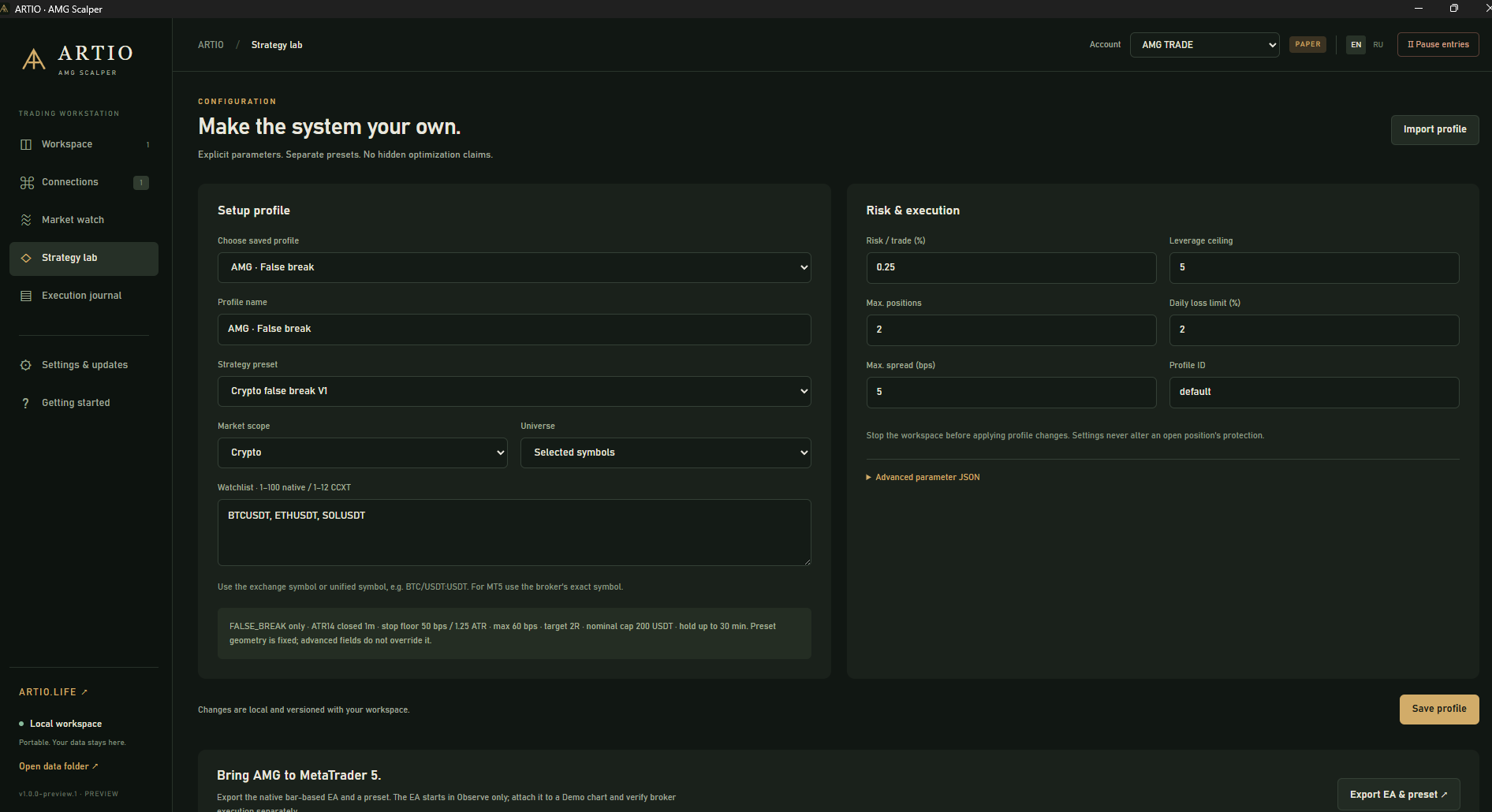
False breaks only, with confirmation of the return. ATR14 from closed 1m candles; stop distance at least max(0.50%, 1.25 ATR), skipped above the 0.60% ceiling; 2R target, up to 200 USDT nominal subject to budget and depth, up to 30 minutes holding time.
03 / SETUP
Continuation and false-break setups using the original AMG logic: book imbalance and executed trades must support the direction. General parameters, early exits and cost checks. Crypto or available TradFi through native Bybit.
04 / SETUP
COHRUSDT only: the 09:30–09:45 New York range, with entries from 10:00–11:00 using closed 15m candles and a previous-close condition. Stop at least 1 ATR and no more than 3%, 2R target, up to 6 hours holding time. Calendar support is limited to 2026; later years are blocked until updated.
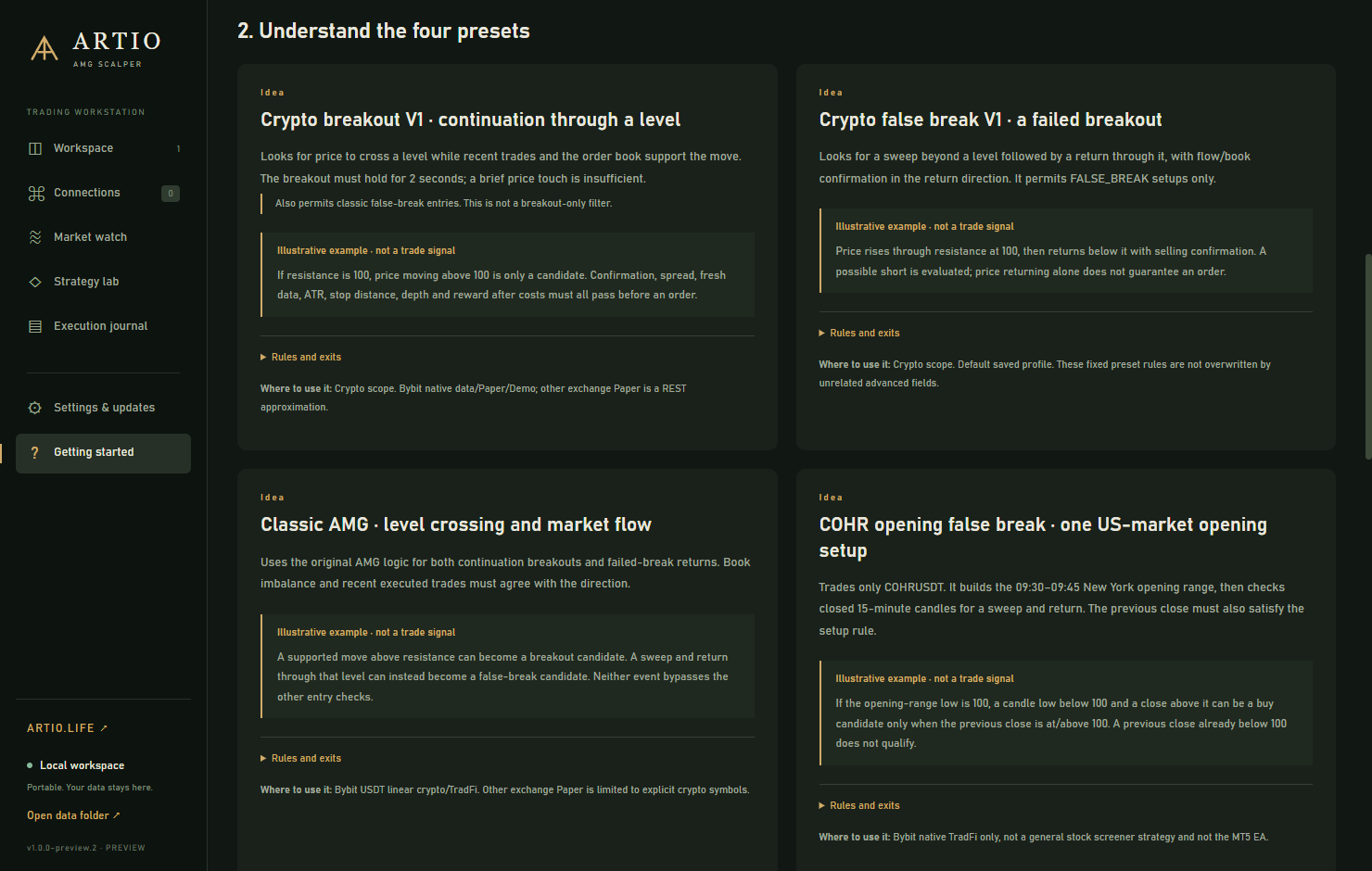
Continuation beyond a level and a sweep-and-return need different conditions. Select a profile, set its boundaries and follow the decision. Four desktop presets differ in confirmation, stop and exit rules, so you can compare them before starting a mode.
Per-trade risk, leverage ceiling, position count, daily loss and spread have dedicated controls. Save profiles, import them and assign them to individual connections. Configured limits do not guarantee the size of a realised loss.
Quotes, candles, waiting reasons, signals, orders and fills live in one workspace. The journal helps distinguish a setup that has not qualified from a data problem, and an order acknowledgement from an actual fill.
Separate accounts and environments, local profiles and Windows DPAPI credential encryption. English and Russian interface. Extract the full package and launch the EXE; a separate Python installation is not required.
PREVIEW.2 / STRATEGY GUIDE
03 / STRATEGY LAB
04 / CONNECTIONS
USDT Linear and available TradFi: data, observation, Paper and explicitly armed Demo orders with native SL/TP. Up to 100 selected symbols, automatic top-100 crypto or available TradFi. Private execution acceptance for this portable build is still outstanding. Live Bybit orders are disabled.
A catalogue of 104 API adapters: connection options, not 104 accepted automated execution venues. Public requests were checked on Bybit, OKX and Kraken. Generic Paper uses REST samples with up to 12 selected crypto symbols per connection; inverse contracts are blocked. Availability depends on the specific market and API.
The desktop app reads a local terminal through the official SDK. Install and enable the EX5 separately in MT5; ObserveOnly=true and AllowRealAccount=false are the defaults. This is a closed-bar strategy, not a port of the order book, tape or four desktop presets. Broker acceptance remains outstanding.
05 / START
06 / RELEASE
The creator supplied preview.2 on 30 October 2026. The changes below refer to this version.
07 / FAQ
These answers also appear in the shared help centre.
This is a separate Windows x64 portable app with a workspace, connections, strategies and journal. It does not require TradingView and is distinct from the free AMG LIVE TradingView publication. A separate MT5 companion EA is also included.
Open answer ↗The current release is a preview. Desktop exchange orders can be armed only for Bybit Demo; live exchange orders are disabled. MT5 uses a separate EA with ObserveOnly=true and AllowRealAccount=false by default, and broker acceptance remains outstanding. An EXE does not establish live-trading readiness.
Open answer ↗Four desktop presets: Crypto breakout V1, Crypto false break V1, Classic AMG levels & flow and COHR opening false break. Breakout V1 retains classic false-break entries; False break V1 permits only the sweep-and-return setup. Classic uses both. COHR is restricted to COHRUSDT, its New York window and the 2026 calendar.
Open answer ↗No. 104 is the number of available CCXT API adapters. In this preview they provide available data, account reads and REST Paper, not live automated execution. Public requests were checked on Bybit, OKX and Kraken. Support for an instrument and account depends on the venue.
Open answer ↗Paper simulates equity and fills within the app. Bybit Demo sends actual API orders to Bybit’s separate simulated environment and requires matching Demo credentials and explicit arming. Demo and Testnet are different environments. Private acceptance of the new portable path remains outstanding; neither mode by itself proves profitability.
Open answer ↗No. The MT5 EA is a separate closed-bar strategy. InpSetup=0 selects false breaks and InpSetup=1 selects breakouts. Export maps risk, daily loss and max_positions; it does not transfer the four desktop presets, tape, order book or COHR. Install and enable the EA separately in the terminal.
Open answer ↗Enter credentials locally in the app. Windows DPAPI encrypts them for the current Windows user and machine. The sales website does not need them. Never send credentials, data/secrets or a full workspace to support. Re-enter keys after moving to another Windows machine. Public quotes require no credentials.
Open answer ↗The desktop engine needs the app, network and an awake Windows session. Server-side SL/TP do not replace local time exits, data-loss exits or recovery. The MT5 EA needs its terminal and chart running, but once installed can run without the desktop app open. Venue schedules and maintenance breaks still apply.
Open answer ↗Check the mode, assigned profile and waiting reason in the journal. No setup, stale book or tape, ATR, history, spread, depth, volume rounding, budget, position limits or the COHR session can block an entry. A working engine can correctly make no trades. Do not weaken safeguards merely to produce a trade.
Open answer ↗Pause entries, finish reconciliation and confirm there are no positions or unresolved orders. Close the app and back up data/ and profiles/ locally. Replace only the EXE in the same folder, then inspect the version, account and profile. The preview.1 → preview.2 upgrade was checked; this does not verify arbitrary future migrations.
Open answer ↗Do not clear the gate just to allow new entries. Reconcile positions, orders, fill history and native SL/TP at the selected venue. Pausing entries preserves position management; closing can be blocked by exposure or unresolved orders. In MT5, do not delete a persisted UNKNOWN variable without reconciliation.
Open answer ↗No separate Python installation is required; the portable ZIP bundles the runtime. Extract the complete package into a writable local folder and launch the EXE. This preview has no purchase check, subscription expiry or commercial activation. That is not a free licence or a promise of future commercial terms. The EXE is unsigned and clean-Windows VM acceptance is outstanding.
Open answer ↗No. The screenshots show the interface and PAPER mode, not verified profitability. Tests, real quotes and a compiled EA do not prove profitability. Results from another AMG installation do not transfer to this portable build. The product provides a configurable workflow and decision controls; the user retains trading risk.
Open answer ↗990 USDT. Pay USDT through Bybit UID, TRC20 or BEP20. After the owner reviews incoming funds, the file appears in My purchases. Personal licence for the stated build; source, resale and future major versions are excluded. Buying does not start trading. This is a prerelease: acceptance with your broker and on a clean system is unverified; test in demo first. MQL5 Market publication is not claimed. Includes the Windows app, compiled MT5 EX5 companion, guides and notices. MQ5 and Windows application source are excluded.
Open answer ↗08 / DELIVERY
Особисте безстрокове використання поставленої Windows-версії 1.0.0-preview.2 на своїх комп’ютерах. Без підписки, передачі копій та перепродажу. У комплекті скомпільований MT5 EX5; MQ5 і вихідний код Windows-застосунку виключено. Майбутні версії та персональна підтримка не обіцяються.
Price for new purchases. Existing purchase rights remain unchanged.
The EXE has no commercial activation or subscription check. A website purchase does not enable trading.
The archive is prepared for protected delivery. There is no public link that bypasses a purchase.
AMG / ARTIO JOURNAL
Explore AMG in depth: continuation, sweep-and-return, four profiles, risk rules and the decision journal. Actual screens and the workflow from observation to execution checks.