
INSIDE THE MINUTE
One minute.
More detail.
See the shape of movement inside M1. ARTIO Seconds Chart builds second-based Bid candles from available broker ticks: 1–60 seconds, with S12 as the default. An additional scale for scalpers who want to see the sequence.
Особиста редакція · оформлення в ARTIO
Movement has
an inner structure.
AI campaign artwork. An actual saved view appears below.
CONTEXT → DETAIL → YOUR DECISION
One candle shows the result.
Inside is a sequence.
A one-minute chart keeps the context. But the approach to a high, a return and another move can all sit inside one candle. Seconds Chart adds a shorter time-based view: observe the shape of brief intervals beside M1 and keep the ordinary chart for trading coordinates.
ACTUAL SAVED INTERFACE / MT5
An actual MT5 seconds view
SAVED NATIVE VIEW / HISTORICAL EXAMPLE
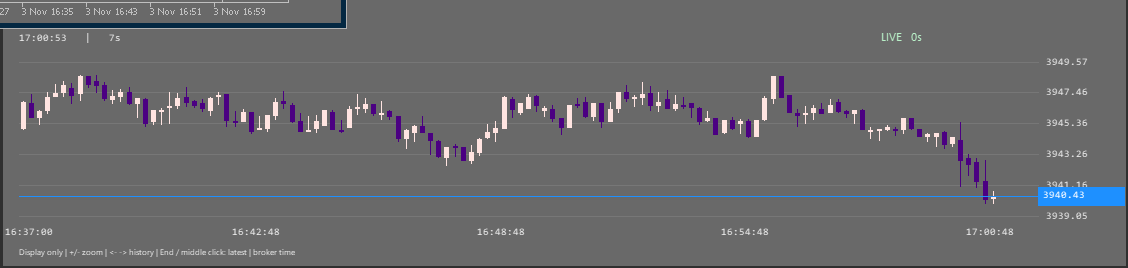
Saved capture of an actually observed MT5 seconds view. Correspondence between the loaded build and the selected EX5 has not been separately established; S12 is not visible in this frame. LIVE belongs to the capture moment. Not a current feed or trading result.
TIME / INTERVAL / BID
What S12 means.
Sixty seconds contain five 12-second time intervals. A candle exists only where qualifying broker ticks are available: empty intervals are not filled with invented prices. This is a time schematic, not a comparison of actual quotes.
Explanatory schematic without market data
CLOSER TO THE DETAIL
Look at movement
in shorter intervals.
Candles follow broker tick timestamps. Choose an interval for your observation task, adjust zoom, browse available history and return to the latest candle. The unfinished candle changes as new quotes arrive.
- 1–60 seconds, 50–2,000 history bars and 20–500 visible bars.
- Plus/minus and Ctrl + wheel zoom; arrows browse history.
- End or middle-click returns to the latest candle.
For observation, not execution.
Closer to movement.
Clear about the boundaries.
Keep M1 for analytical objects and order placement. The seconds canvas is a separate visual layer; standard indicators, objects and trading coordinates do not automatically become second-based. S12 is not added to MT5’s native timeframe list.
LIVE requires advancing quote time and connection; 30 seconds without new ticks triggers a warning. Redraw timing is not a market-feed speed guarantee.
SECONDS / TICK
Two views. Different jobs.
Seconds Chart ↗
Bid candles over 1–60 seconds, with history, zoom and freshness checks.
THE QUOTE SEQUENCETick Chart ↗
Bid/Ask lines by quote index. Both sides and the gap between them.
These tools complement each other and remain separate products. No new bundle or combined price is offered here.
ARTIO / Blog
Minute context.
Second-level detail.
A guide for the XAUUSD scalper: why to look inside the move, how to read S12 beside M1, choose an interval and distinguish a visual chart from trading coordinates.
Read the complete guide ↗SETUP / 1.0.0
Add a dedicated view.
- Install the approved client EX5 in MQL5/Indicators. MQ5/MQH source files are not part of standard delivery.
- Open a separate M1 chart of the broker symbol and attach the indicator.
- Choose a 1–60 second interval and wait for ticks. Keep an ordinary chart for trading coordinates.
QUESTIONS / SHARED ANSWERS
Questions worth understanding.
Can I choose another interval?
Yes, 1–60 seconds. Twelve seconds is the starting setting; history depends on broker ticks.
Open shared answer ↗Can I place precise limit orders here?
Use an ordinary price chart: trading-coordinate conversion is not provided.
Open shared answer ↗What is included in the proposed purchase?
49 USDT. Pay USDT through Bybit UID, TRC20 or BEP20. After the owner reviews incoming funds, the file appears in My purchases. Personal licence for the stated build; source, resale and future major versions are excluded. Buying does not start trading. This is a prerelease: acceptance with your broker and on a clean system is unverified; test in demo first. MQL5 Market publication is not claimed.
Open shared answer ↗How does the horizontal axis work?
Candles aggregate qualifying ticks into 1–60 second time intervals, using broker timestamps. Empty intervals are not filled with artificial candles. The current candle is unfinished.
Open shared answer ↗Does an image establish a current live feed?
No. A capture records a past moment. In the program LIVE requires advancing quote time, connection and no history error; 30 seconds without new ticks triggers a warning. History depends on available broker ticks.
Open shared answer ↗Can I buy and download it right now?
49 USDT. Pay USDT through Bybit UID, TRC20 or BEP20. After the owner reviews incoming funds, the file appears in My purchases. Personal licence for the stated build; source, resale and future major versions are excluded. Buying does not start trading. This is a prerelease: acceptance with your broker and on a clean system is unverified; test in demo first. MQL5 Market publication is not claimed.
Open shared answer ↗ARTIO / SECONDS CHART
M1 for context.
Seconds for detail.
ARTIO Seconds Chart MT5 · 1.0.0
Compiled software, RU/EN instructions and a manifest. No source code or account data.
Особисте використання поставленої редакції на зазначеній платформі. Вихідний код, перепродаж, інші продукти та персональне налаштування не входять. Покупка не запускає торгівлю й не підтверджує сумісність із вашим брокером.
Обмеження та перевірка сумісності
- Acceptance with available tick history, absent quotes and a clean profile.