


NATIVE METATRADER 5 / ARTIO
Your market.
Your decision.
Your IMPERATOR.
Bring the whole manual trade into MetaTrader 5: entry, position, partial exit, hotkeys, macros and a management plan. One native console. One EX5. Your decisions at the centre.
Особиста редакція · оформлення в ARTIO
Keep control
close to the decision.
NATIVE CONTROL / METATRADER 5
The trade continues
after the Buy button.
Entry is the beginning. Next comes finding the right position, reducing size, changing management and knowing where the next command will go. In a fast market, attention matters too much to spend it hunting through controls. IMPERATOR brings these actions into a native MT5 console.
Analyse on your charts. Manage from your console.
INSIDE IMPERATOR / 1.013
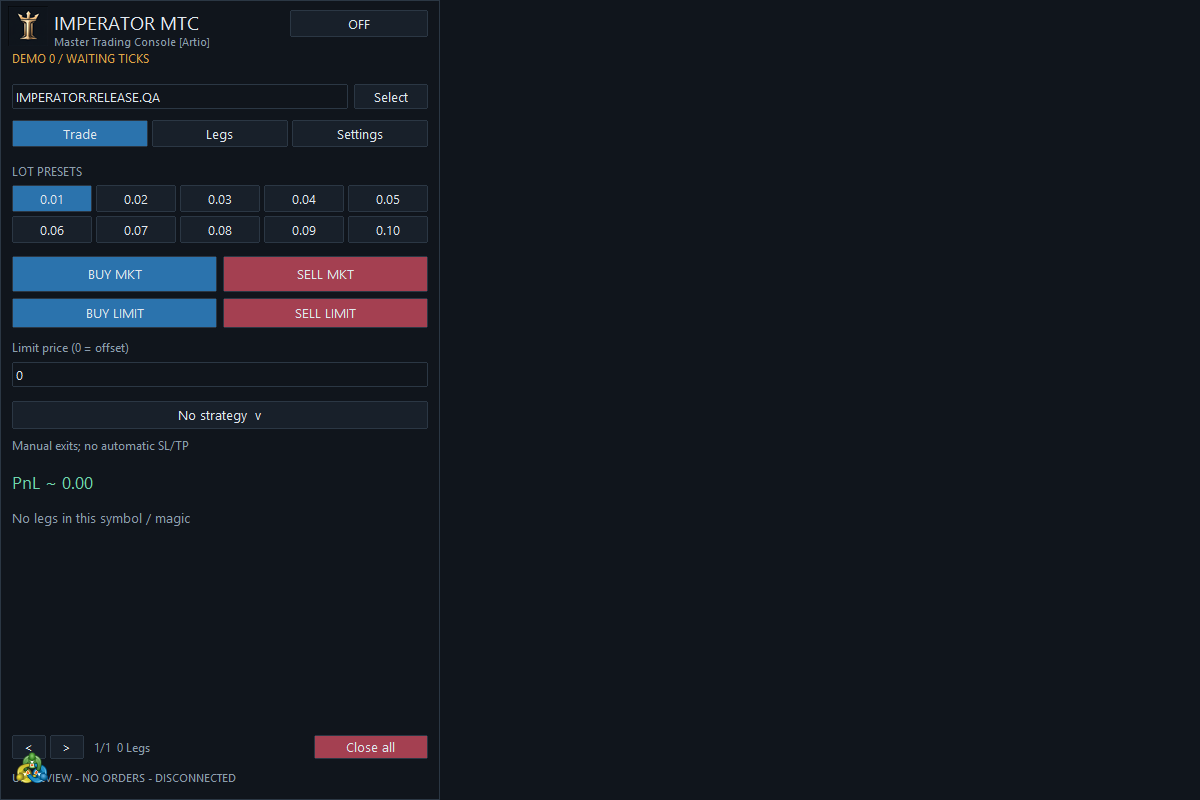
Full console
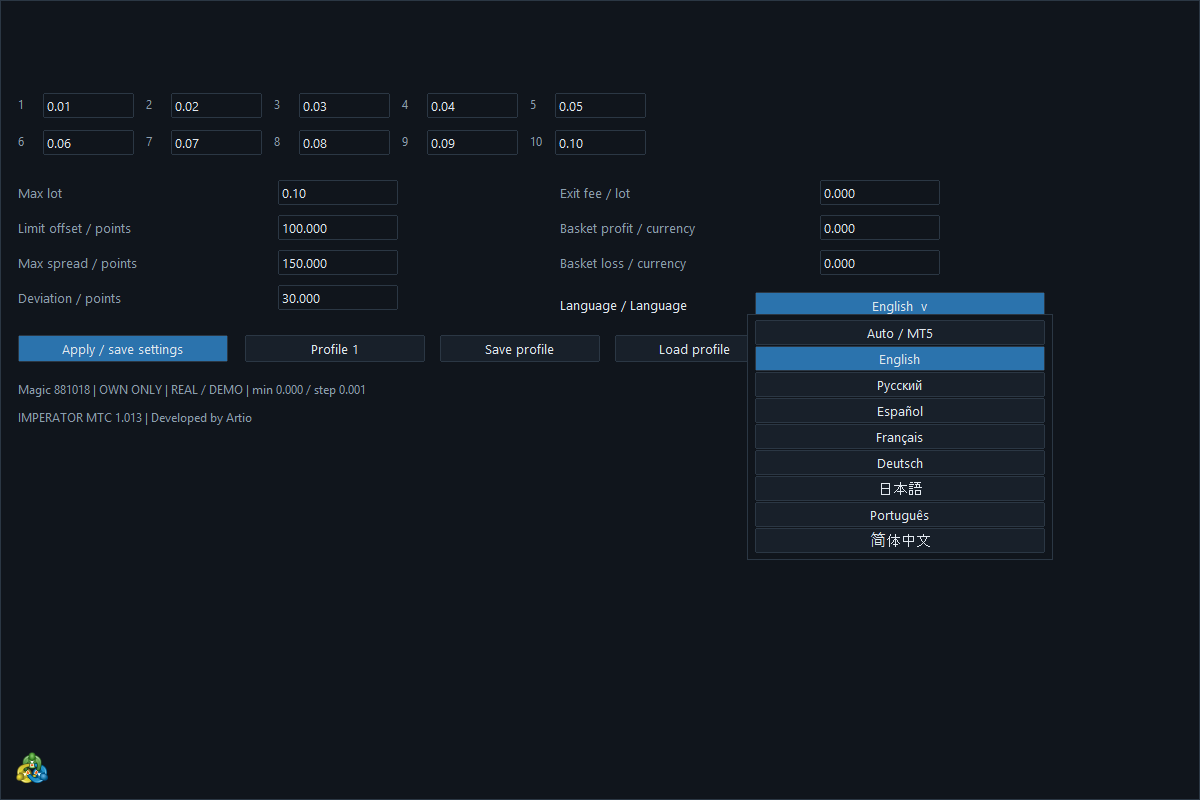
Actual English UI in disconnected QA. Empty positions have not been replaced with invented trades.
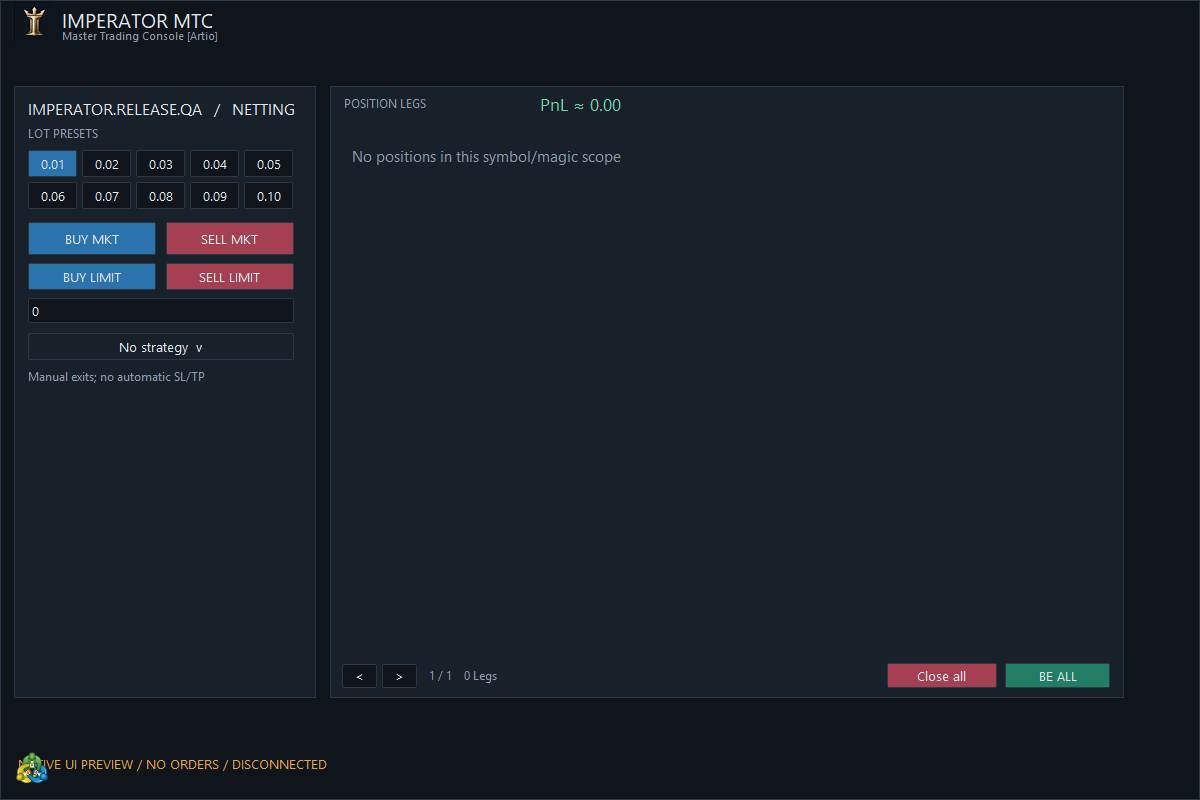
NATIVE UI / EN / DISCONNECTED QA / NO ORDERS
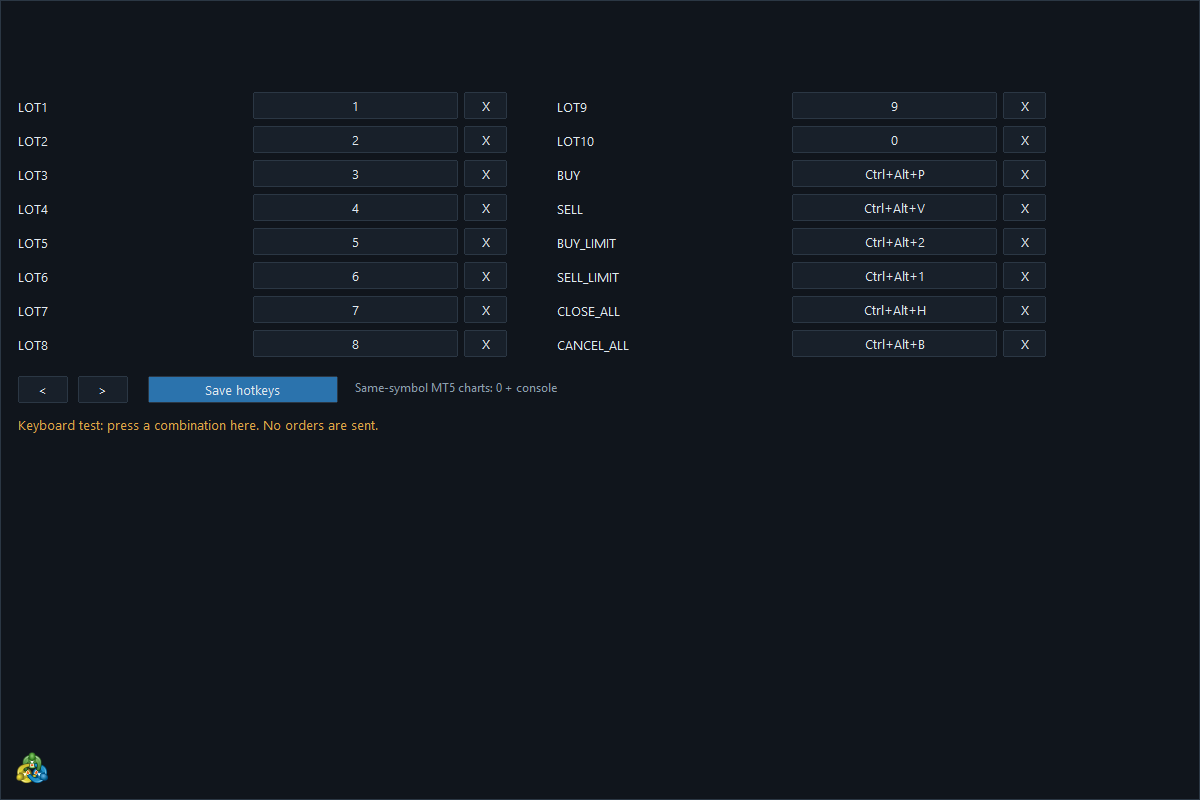
01 / KEYS & FOCUS
Decision made.
Command within reach.
Map keys to your own actions and check bindings in no-order diagnostics. Hotkeys work in the console and eligible charts of the exact broker symbol, including its suffix.
- Ten size choices: prepare the values you actually use.
- Charts and console remain inside the same MT5.
- These are MT5-scoped keys, not global Windows shortcuts.
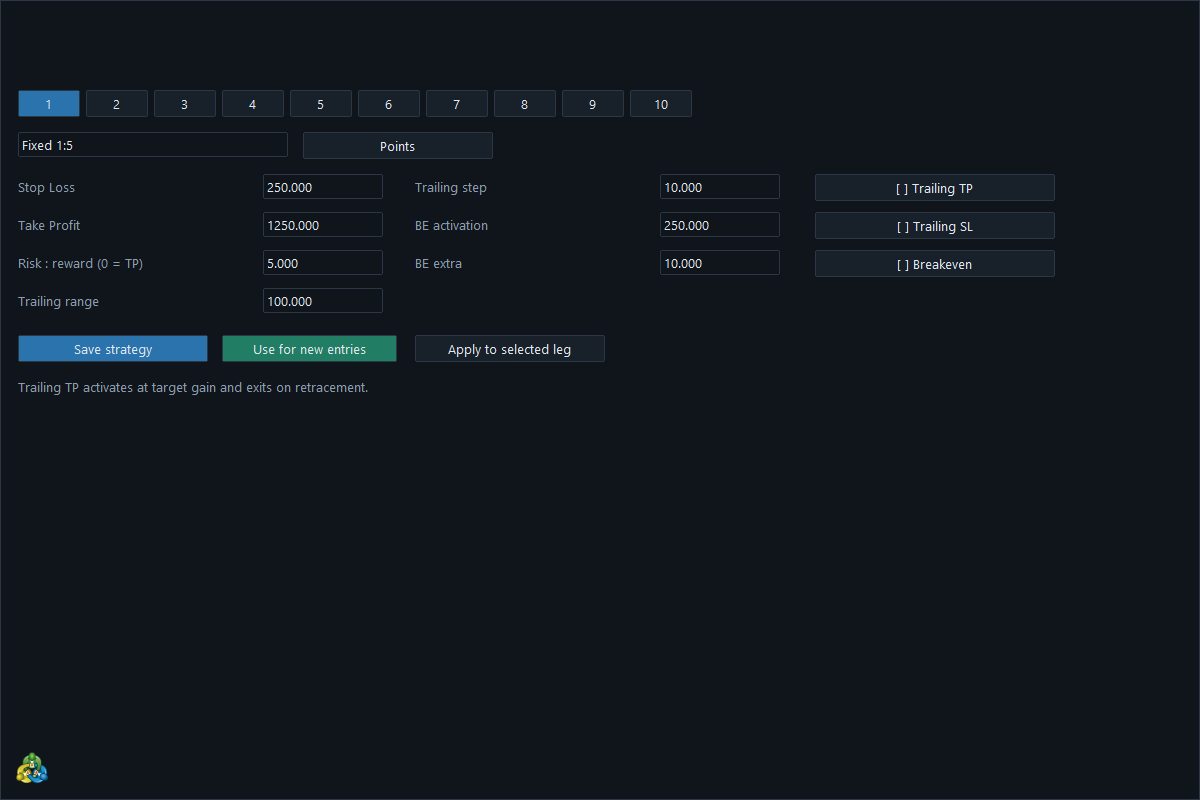
02 / POSITION MANAGEMENT
Give the entry
a management plan.
Save SL/TP, trailing stop, virtual trailing profit and breakeven in an exit preset. Select it for a new entry or explicitly apply it to an existing eligible position. A 25/50% partial exit depends on the broker’s volume minimum and step.
- Ten exit presets for different management workflows.
- Eligible ticket cards show size and estimated open PnL.
- No strategy is selected initially: there is no automatic SL/TP.
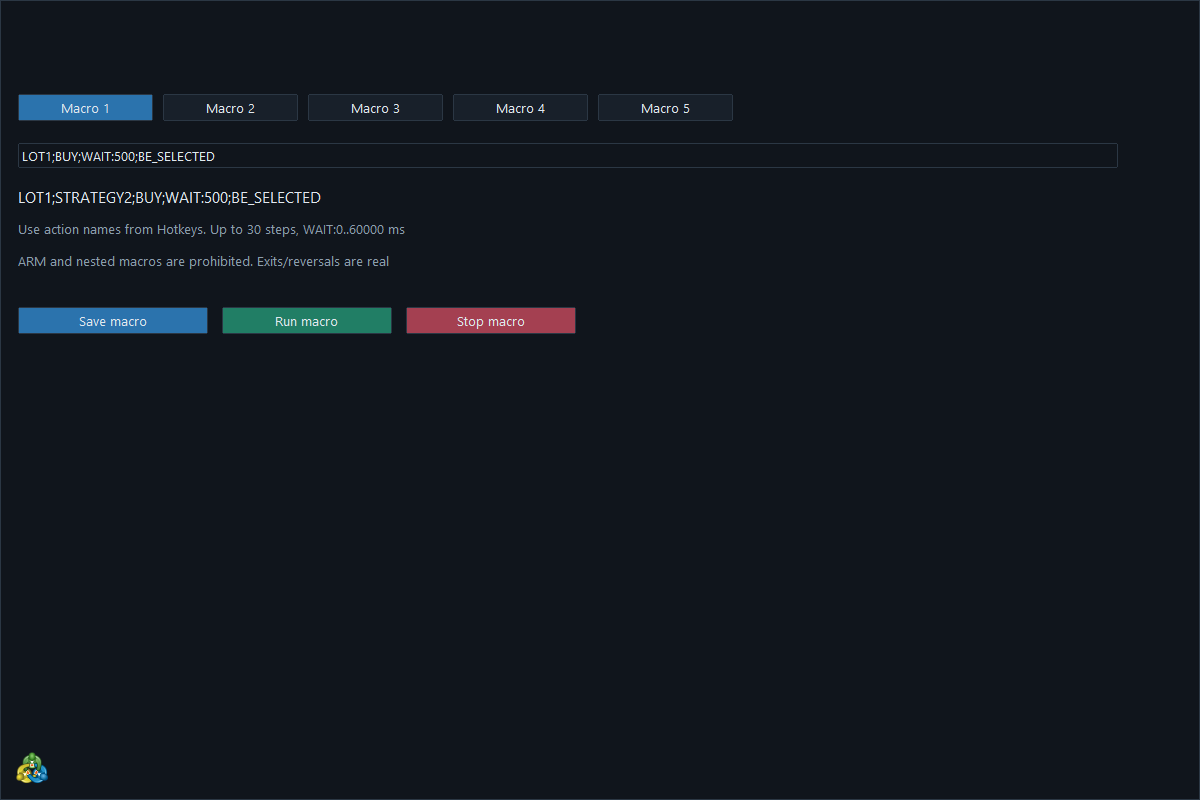
03 / REPEATABLE ACTIONS
Define the sequence
before the moment.
Five editable macros turn recurring commands into an explicit sequence, with up to 30 steps and configurable waits. You choose which sequence to start. Execution stops at the first failure.
- Volume choices, position commands and management selection.
- WAIT steps from 0 to 60,000 ms.
- A sequence is not atomic; no automatic retry after a failure is promised.
POSITION / SCOPE / OWNERSHIP
Manage a specific position.
Know the scope of the command.
Symbol and magic define eligible positions. Manual magic-0 positions are an explicit opt-in. Hedging supports independent legs; netting aggregates the position and mixed ownership is refused. Reverse is a close followed by an attempted opposite entry.
Estimated BE, PnL and basket thresholds depend on the cost model; the final trade result is not guaranteed.
YOUR WORKSPACE / YOUR RULES
A workspace
you have made your own.
Compact and full views, five workspace profiles and eight languages. Keep your configuration locally; use the compact console when the chart needs more room. IMPERATOR requires neither DLLs nor an external Windows companion.
IMPERATOR / APEX
One trading style.
Two ways to organise control.
IMPERATOR MTC
Native console inside MT5. One EX5, no external companion.
INSIDE MT5 / EX5
APEX Scalping Terminal ↗
A separate Windows window connected to MT5.
WINDOWS + MT5IMPERATOR runs inside MT5. APEX is a separate Windows window connected to MT5. These are independent alternatives; you do not need both for core execution. Use one active trading executor at a time.
ARTIO / Blog
Why a trader needs
a complete control console.
Explore IMPERATOR in depth: managing beyond entry, gold scalping, chart hotkeys, action sequences and deliberate position management. With actual interface captures and practical explanations.
Read the IMPERATOR article ↗SETUP / 1.013-MARKET-CANDIDATE
Prepare your IMPERATOR.
- Obtain the approved EX5 and guide. The internal developer archive is not an installation package.
- Place the EX5 in MQL5/Experts in the MT5 data folder. Refresh Navigator and use a separate demo chart of the exact symbol.
- Before execution, check symbol/magic, account type, volume and the explicitly selected exit strategy. Do not enable trading just to inspect the UI.
QUESTIONS / SHARED ANSWERS
Know the details before you begin.
Does it find entries automatically?
No. It executes your decisions and selected management rules, without promising profitable signals.
Open shared answer ↗Do I need ARTIO Desktop?
No. IMPERATOR is one EX5 inside MT5. Desktop is a separate alternative workflow, not a required add-on.
Open shared answer ↗Can I buy or rent it now?
249 USDT once or 39 USDT for 30 days. Renew manually with a new invoice; no automatic debit or offline software lock is promised. Pay USDT through Bybit UID, TRC20 or BEP20. After the owner reviews incoming funds, the file appears in My purchases. Personal licence for the stated build; source, resale and future major versions are excluded. Buying does not start trading. This is a prerelease: acceptance with your broker and on a clean system is unverified; test in demo first. MQL5 Market publication is not claimed.
Open shared answer ↗Do hotkeys work from every Windows application?
No. They belong to the console and eligible MT5 charts of the exact broker symbol, including its suffix. The embedded relay supports up to 32 such charts. Diagnostics checks bindings without execution. Physical keyboards, layouts and scaling require separate acceptance.
Open shared answer ↗Does software management continue with MT5 closed or OFF?
No. Virtual trailing, software breakeven and basket monitoring require running MT5 and EA, connection and advancing quotes. Escape switches the console OFF and stops software workflows; it does not close positions or cancel orders. Accepted server-side SL/TP remain. Basket monitoring must be re-enabled after restart.
Open shared answer ↗How do hedging and netting differ for IMPERATOR?
Hedging allows independent legs and hedge actions. Netting aggregates the symbol position; mixed ownership is refused. Commands target eligible symbol/magic positions; manual magic-0 positions require explicit opt-in. Reverse and group actions are sequential, not atomic.
Open shared answer ↗Can I buy and download IMPERATOR now?
249 USDT once or 39 USDT for 30 days. Renew manually with a new invoice; no automatic debit or offline software lock is promised. Pay USDT through Bybit UID, TRC20 or BEP20. After the owner reviews incoming funds, the file appears in My purchases. Personal licence for the stated build; source, resale and future major versions are excluded. Buying does not start trading. This is a prerelease: acceptance with your broker and on a clean system is unverified; test in demo first. MQL5 Market publication is not claimed.
Open shared answer ↗IMPERATOR / ACCESS
Your decision deserves
a dedicated console.
Version and package contents
IMPERATOR MTC · 1.013-MARKET-CANDIDATE
Compiled software, RU/EN instructions and a manifest. No source code or account data.
Особисте використання поставленої редакції на зазначеній платформі. Вихідний код, перепродаж, інші продукти та персональне налаштування не входять. Покупка не запускає торгівлю й не підтверджує сумісність із вашим брокером.
Обмеження та перевірка сумісності
- Broker acceptance: partial fills, disconnects, UNKNOWN, macros and position management.
- Keyboard, display scaling and protected-installation checks; no MQL5 Market publication yet.