BOTH SIDES OF PRICE
Price has two sides.
See both.
Incoming Bid and Ask in a dedicated MetaTrader 5 tick view. ARTIO Tick Chart helps you observe quote micro-movement and the gap between the two sides beside a regular chart, with a clear distinction from a trade tape.
Edición personal · compra en ARTIO
Two sides of the quote.
One closer look.
AI campaign artwork. An actual saved view appears below.
CONTEXT → DETAIL → YOUR DECISION
See how the quote
itself changes.
An ordinary candle is useful for time context. Observing both sides of price calls for another view. Tick Chart draws Bid and Ask lines from available broker quote history, so you can inspect their movement and spread while keeping M1 alongside.
ACTUAL SAVED INTERFACE / MT5
An actual MT5 tick view
SAVED NATIVE VIEW / HISTORICAL EXAMPLE
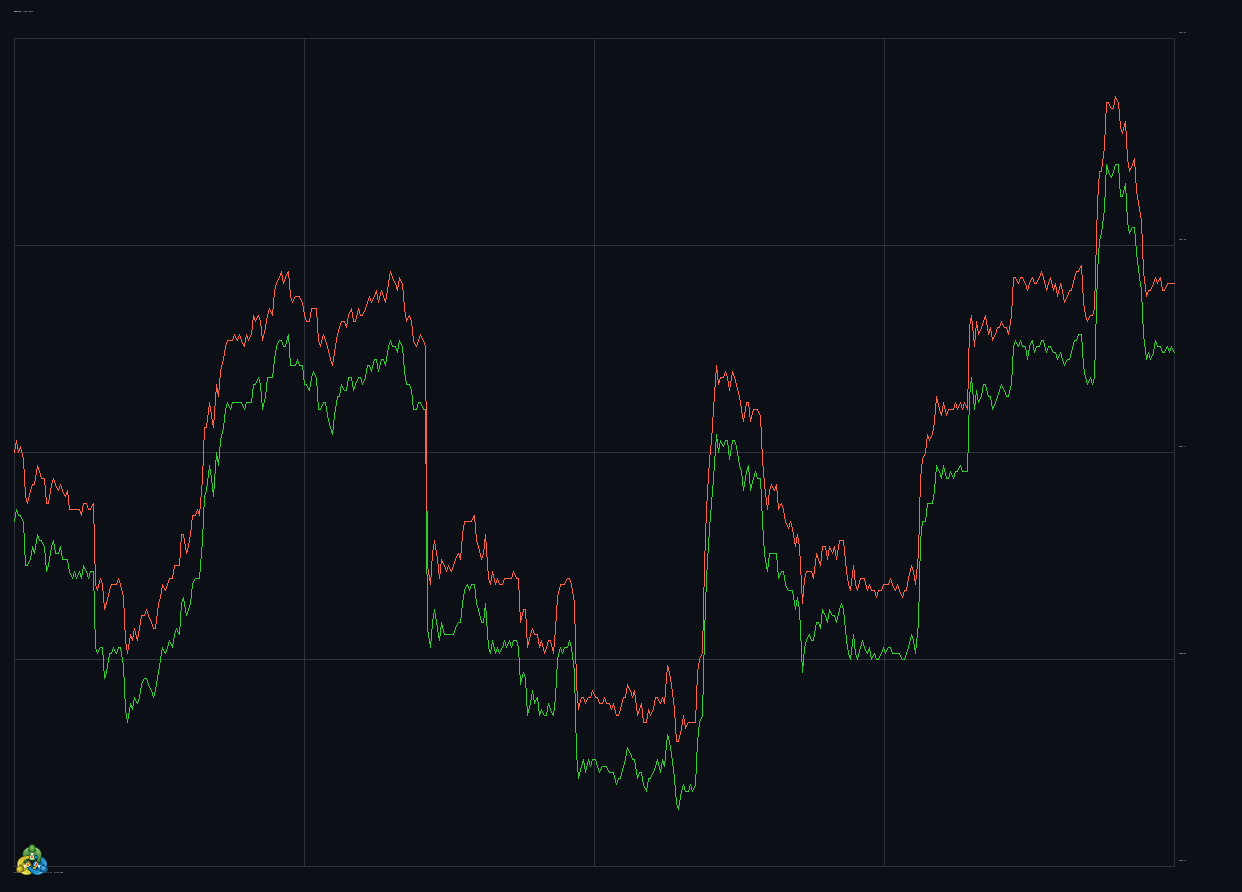
Actual saved capture of a native MT5 tick view: Bid/Ask lines. Correspondence between the loaded build and the selected EX5 has not been separately established. A historical example, not current quotes, market depth or a trade tape.
BID / ASK / SPREAD
What sits
between Bid and Ask.
The difference between the two quote sides is the spread. Its size depends on the broker, symbol and moment. This schematic explains the labels; it contains no market prices and establishes neither depth nor traded volume.
Spread
Explanatory schematic without market data
CLOSER TO THE DETAIL
Two lines.
Two observations.
Bid and Ask can change differently. Inspect the gap between the lines and the sequence of received changes. The number of displayed quotes determines the view’s density; it does not specify a duration in seconds.
- 50–2,000 quotes; the default is 500.
- Green Bid and red Ask by default, with configurable colours.
- Horizontal spacing follows quote order, not equal elapsed time.
For observation, not execution.
The quote sequence.
Time context on M1.
Adjacent points are equally spaced by quote index. Fast and slow portions of the feed do not occupy widths proportional to elapsed time. Keep an ordinary chart of the same broker symbol for clock time and candle structure.
The LIVE TICKS heading in this version is static and does not establish freshness. Check connection and quote recency in MT5; Seconds Chart’s dedicated freshness monitor is not claimed here.
SECONDS / TICK
Two views. Different jobs.
Seconds Chart ↗
Bid candles over 1–60 seconds, with history, zoom and freshness checks.
THE QUOTE SEQUENCETick Chart ↗
Bid/Ask lines by quote index. Both sides and the gap between them.
These tools complement each other and remain separate products. No new bundle or combined price is offered here.
ARTIO / Blog
Why one price line
is not the whole view.
Explore Tick Chart: Bid/Ask, the spread while observing gold, the sequence of quote changes and a deliberate place beside M1. Without presenting quotes as an exchange trade tape.
Read the complete guide ↗SETUP / 1.00
Add a dedicated view.
- Install the separate approved EX5 in MQL5/Indicators. The old full Workspace is not required.
- Open a separate chart of the required symbol and attach the indicator.
- Open M1 of the same symbol alongside it, set history and wait for quotes.
QUESTIONS / SHARED ANSWERS
Questions worth understanding.
Are these 100-tick candles?
No. This version displays Bid/Ask lines from incoming quotes.
Open shared answer ↗How does it differ from Seconds?
Tick shows quote lines. Seconds aggregates time-based candles, such as 12-second candles.
Open shared answer ↗Is Workspace required?
29 USDT. Pay USDT through Bybit UID, TRC20 or BEP20. After the owner reviews incoming funds, the file appears in My purchases. Personal licence for the stated build; source, resale and future major versions are excluded. Buying does not start trading. This is a prerelease: acceptance with your broker and on a clean system is unverified; test in demo first. MQL5 Market publication is not claimed.
Open shared answer ↗How does the horizontal axis work?
Points are equally spaced by quote index. This is a Bid/Ask sequence, not an evenly scaled time axis. Five hundred quotes do not mean 500 seconds or 500 trades.
Open shared answer ↗Does an image establish a current live feed?
No. The saved image is historical. The selected source version has a static LIVE TICKS heading that does not verify freshness; check connection and quote recency in MT5. Seconds Chart’s freshness monitor is not claimed here.
Open shared answer ↗Can I buy and download it right now?
29 USDT. Pay USDT through Bybit UID, TRC20 or BEP20. After the owner reviews incoming funds, the file appears in My purchases. Personal licence for the stated build; source, resale and future major versions are excluded. Buying does not start trading. This is a prerelease: acceptance with your broker and on a clean system is unverified; test in demo first. MQL5 Market publication is not claimed.
Open shared answer ↗ARTIO / TICK CHART
Keep the context.
Look at both sides.
ARTIO Tick Chart MT5 · 1.00
Compiled software, RU/EN instructions and a manifest. No source code or account data.
Uso personal de la edición entregada en la plataforma indicada. No incluye código fuente, reventa, otros productos ni configuración personal. La compra no inicia operaciones ni confirma la compatibilidad con tu bróker.
Limitaciones y comprobaciones de compatibilidad
- Tick feed, history and selected-binary checks; side-by-side photography with M1.